
AI Readiness
Take Copilot and
Data Agents to Production
BI Pixie makes your semantic models and Fabric data agents ready for AI, and proves AI accuracy with benchmarks and A/B tests on your own data. The first AI Readiness assessment is free, for up to 500 semantic models and data agents on every plan.
Free assessment for up to 500 semantic models and data agents

Three problems between you and production
Your organization has committed to adopting AI, and the question is no longer whether to do it but whether the answers can be trusted. Copilot and Fabric data agents generate their answers from the metadata inside your semantic models.
A wrong answer by AI looks like a right one
An AI agent that lacks context does not report an error. It returns a confident answer that may be wrong, and the first warning is a wrong number in an executive review. BI Pixie measures whether a semantic model can support correct answers before you open it to AI.
Get AI Readiness at scale
Optimizing one semantic model takes many iterations and tests, and a team can properly curate only a few semantic models a quarter. BI Pixie assesses your mission-critical semantic models and ranks the work by the fields your people actually query, so with AI assisting you optimize each one in minutes instead of hours.
Stay correct as semantic models change
A new measure or a deleted description can break an AI agent that answered correctly last month, and nothing flags it until a user reports it. You run the same benchmark after every change to your semantic models and data agents, and BI Pixie compares it with the run before.
The semantic model is the AI surface
Your Power BI semantic models already carry the business context AI needs, but it was written for people, not for AI agents. It can take time and many iterations until your data analysts can scope down context and resolve the ambiguity, so AI stays accurate.
To help you prepare your semantic models for AI, Power BI released Prep data for AI, which lets you curate the metadata AI needs. But as demand rises to prepare your mission-critical semantic models for Copilot and data agents, you need a way to scale up the effort.
- How do you know which fields to exclude from the AI data schema?
- How do you test AI on the optimized semantic model?
- When do you know the semantic models are ready?
- How can you reduce the iterations and speed up the process?
- Can you scale the effort across business units and your mission-critical semantic models?
BI Pixie was built to answer these questions.
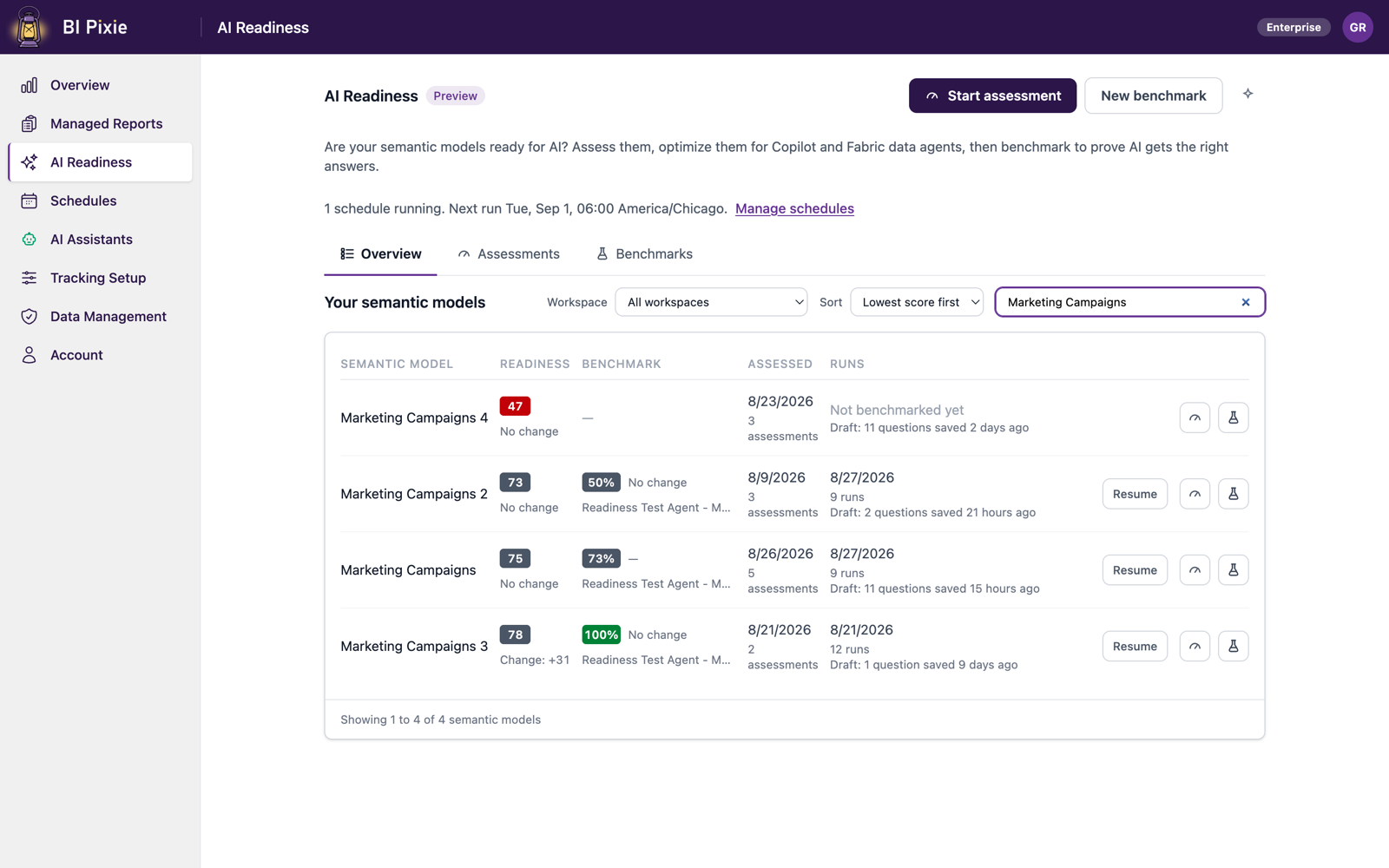
The AI Readiness Loop
Assess, improve, prove, protect, then repeat
A semantic model drifts as people add measures and rename columns, so keeping it AI-ready is ongoing work.
Assess
Assess the AI Readiness of your semantic models and data agents.
BI Pixie reads each definition directly, so you know which semantic models and data agents are ready for AI. The findings are ranked by the fields your people actually query, so you know what to fix first.
Improve
Fix what holds AI back.
BI Pixie drafts the metadata an AI agent needs to answer correctly, from descriptions to AI Instructions. Every change is previewed, editable, and applied by you. Drafting uses an AI you connect yourself, such as Azure AI Foundry, OpenAI, or Anthropic. Assessment never does.
Prove
Test AI on answers you already know.
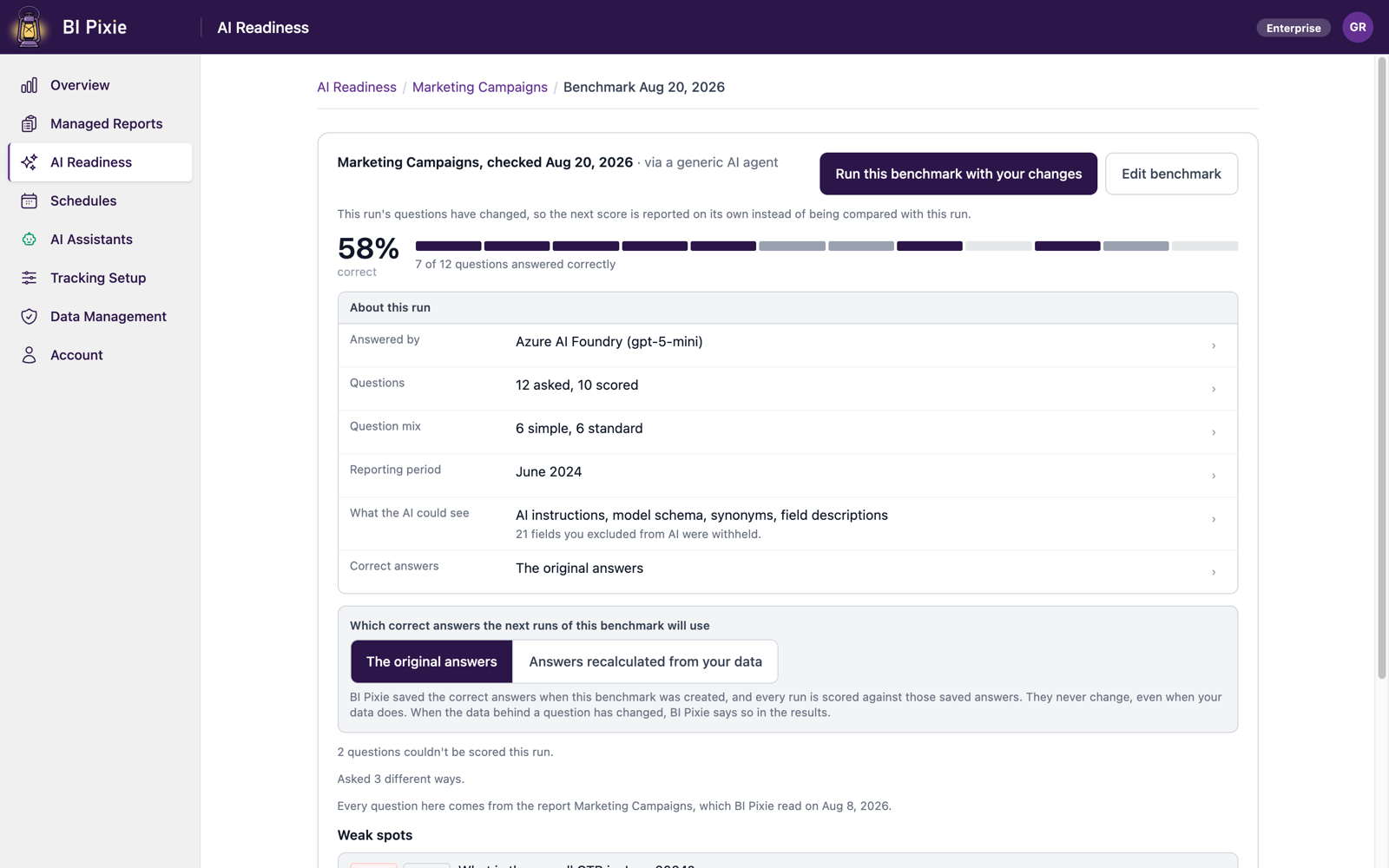
BI Pixie asks questions whose correct answers are computed live in DAX from your own data, then has the AI answer them. You see each answer, the query the AI wrote, and the correct answer beside them.
Protect
Catch inaccuracy before your users do.
Semantic models change, and a new measure or a deleted description can break an AI agent that worked yesterday. You run the identical benchmark again, and BI Pixie compares the result with the run before it.
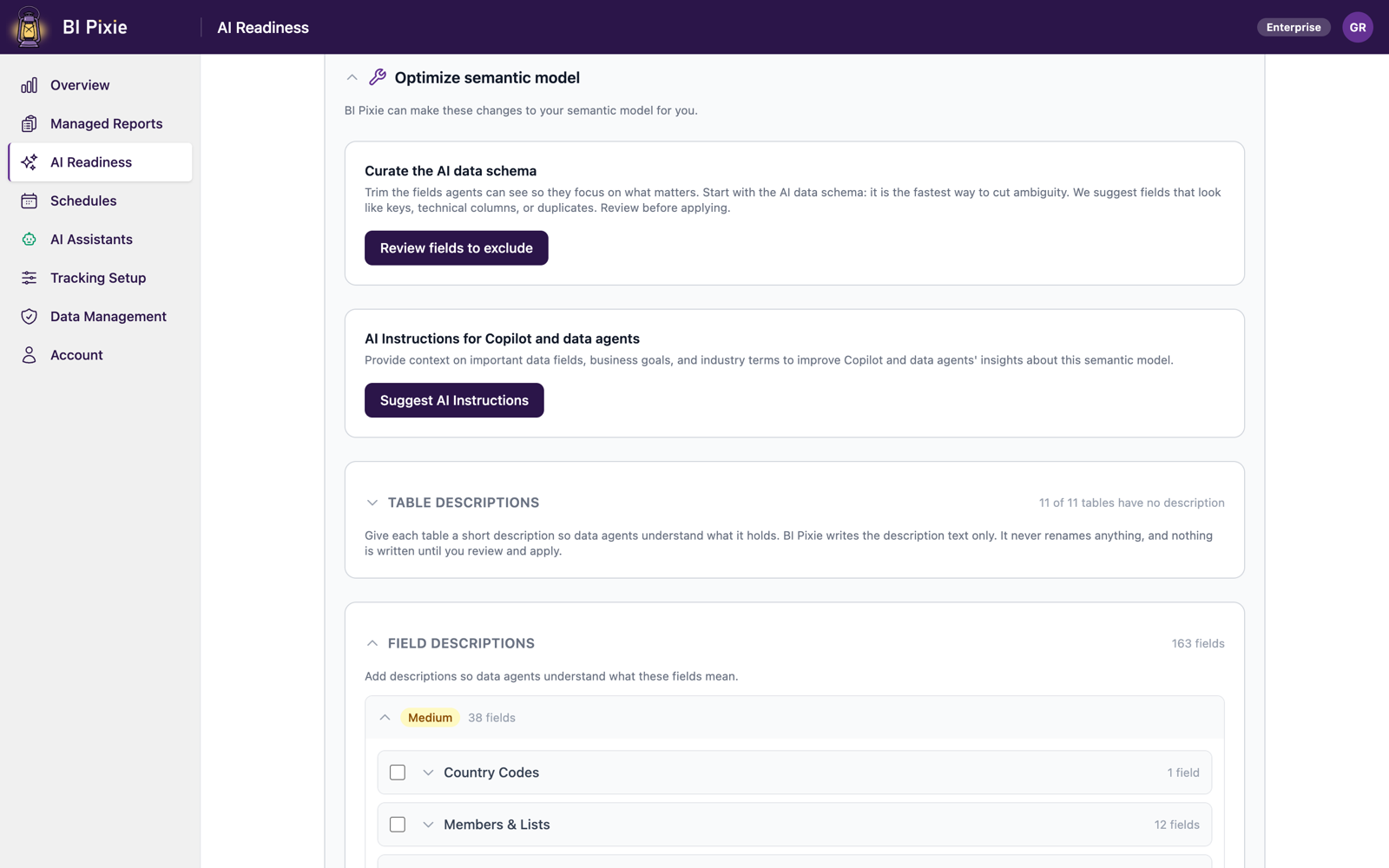
Your BI developers can optimize a semantic model using a variety of tools. Only BI Pixie knows which fields your people actually use, and can scale up that optimization to get you ready for production.
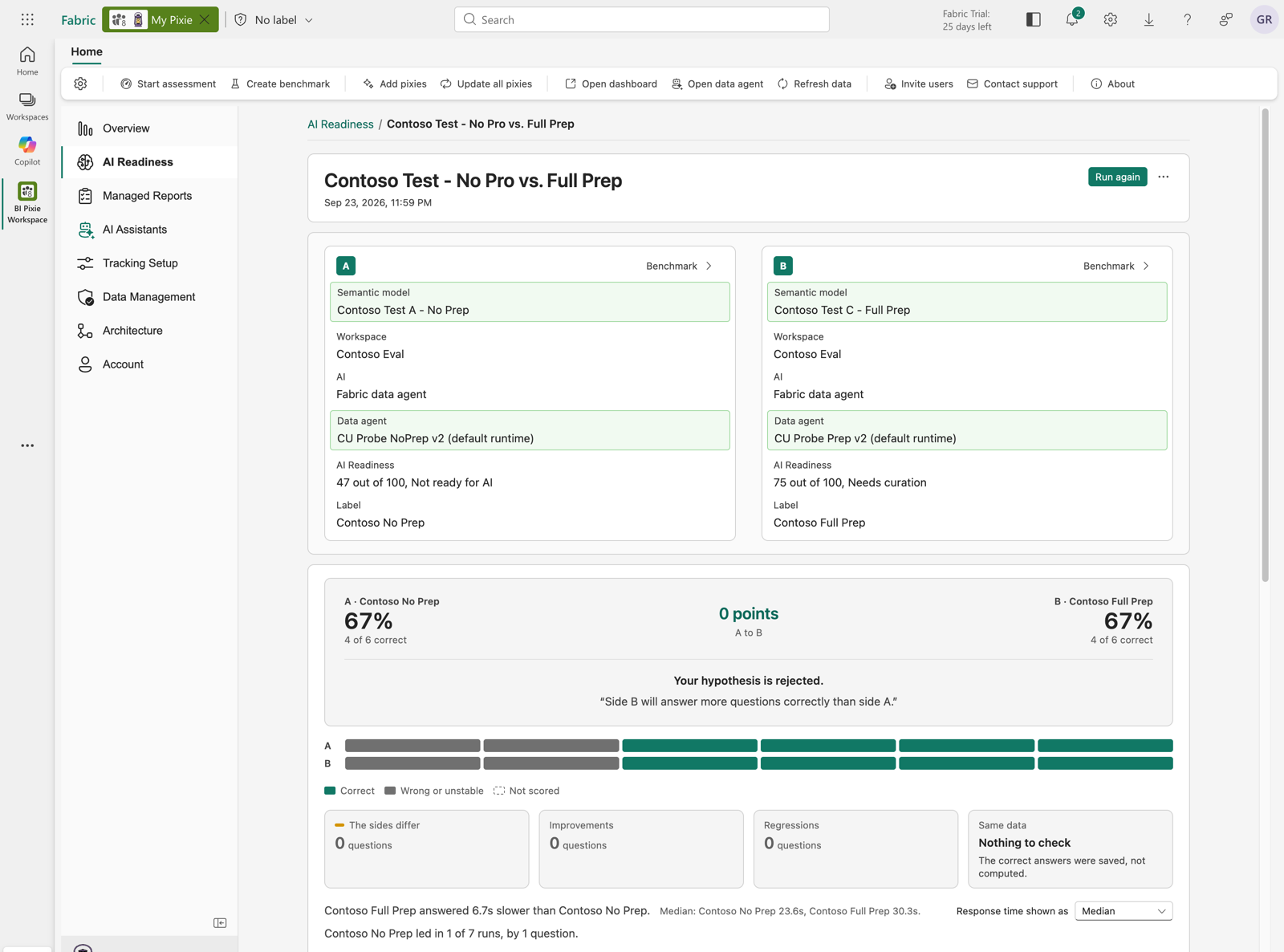
Assess a Fabric data agent, and test whether a change made answers better
Your Fabric data agents decide how AI uses that business context. A data agent with unclear instructions, the wrong data sources or weak example queries can give wrong answers, even on a semantic model your team has already prepared for AI. A data agent carries instructions of its own, the data sources you ground it on, example queries written for those sources, and a runtime. Microsoft Fabric ignores some of what people write there. Instructions on the data agent that explain how to query a semantic model never reach the tool that writes the DAX query, and nothing in Fabric says so. BI Pixie assesses the data agent itself, and an A/B test tells you whether the work you did on a semantic model or on a data agent raised the number of questions answered correctly.
You find out which of your Fabric data agents are ready to answer your users' questions
You know which of your data agents are ready for AI and what to fix first, measured against Microsoft's published guidance for data agents. You read the findings that matter most first, with the Microsoft rule behind each one quoted in full and a link to the page it comes from. BI Pixie assesses a data agent whatever data it is grounded on: semantic models, lakehouses, warehouses, KQL, SQL and mirrored databases. A data agent cannot answer better than the semantic models it is grounded on, so BI Pixie limits its AI Readiness by theirs. Assessing writes nothing to your data agent, and when you want a finding fixed, BI Pixie drafts the change to the instructions or to a data source and you edit and approve it before it is applied.
You learn whether a change to a semantic model, a data agent or the AI you ask made answers better
You choose two sides, A and B, and say what you expect before anything runs, such as side B answering more of the questions correctly. BI Pixie asks both sides the same questions and checks both against the same correct answers, computed from your own data before either side is asked anything. At the top of the result you read what you expected and whether it held, so a change that did not help is as plain to read as one that did. Side A and side B can be the semantic model in production and the copy your team is optimizing, one semantic model answered by both a Fabric data agent and Power BI Copilot, or two data agents that differ only in their instructions. BI Pixie keeps every A/B test with its questions and its result, so the next person who asks whether a change is worth making can read what happened the last time it was tried.
A benchmark's questions and its correct answers come from a semantic model, so they cover the data in that semantic model rather than a data agent's other sources. A data agent grounded on no semantic model at all cannot be benchmarked or put in an A/B test yet. BI Pixie assesses that data agent all the same, and checks the instructions, the descriptions and the example queries of each lakehouse, warehouse, KQL database, SQL database or mirrored database it is grounded on against Microsoft's guidance for that kind of source.
What only BI Pixie can do
You fix what your people actually use first
Anyone can read your semantic model's structure. Only BI Pixie knows which fields your people actually query, so the findings are ranked by what your audience uses rather than by a generic rulebook.
You get an AI Readiness assessment and a benchmark in one product
BI Pixie assesses the semantic model and then answers whether it is actually better, with a benchmark keyed to your own data.
You test the AI you actually ship
You can benchmark through a generic AI agent to diagnose problems, through the same query engine behind Copilot to confirm the result, or through your own Fabric data agent. The generic AI agent is your own AI answering from the semantic model, the way a custom agent would, and every wrong answer it gives is traceable to the query behind it.
You stay in control
Assessment is read-only. Every change is previewed, editable, and applied by you, and assessments never run on your capacity.
Assessment is read-only and repeatable, and every benchmark is graded against answers computed from your own data. BI Pixie collects viewer user names only when you turn on Capture user identity, and until then it counts viewers by a masked IP address.
Catch inaccuracy before executives lose trust
Getting a semantic model AI-ready is work you can finish. Keeping it AI-ready through a year of changes requires evidence that nothing has regressed. On the Enterprise plan, BI Pixie also runs AI Readiness assessments on a schedule you set, so drift in the context is caught early.
You set a baseline before you go live
BI Pixie saves the benchmark questions built from what your people actually use, and you review every question and its computed answer before the first run.
You run the identical benchmark after every change
A single new measure or a deleted description is enough to change the answers an AI agent gives. Because the questions are identical, the comparison is honest.
You choose whether the correct answers are fixed or recomputed
You can check against the answers saved when the benchmark was created, or recompute them from current data. BI Pixie tells you when the correct answers themselves have drifted, and marks a benchmark that was edited, so you always know whether two runs can be compared.
You compare any run with the run before it
Every run is kept per semantic model with its change from the run before, grouped by the AI that was tested. Scores from different AIs are never combined into one trend.
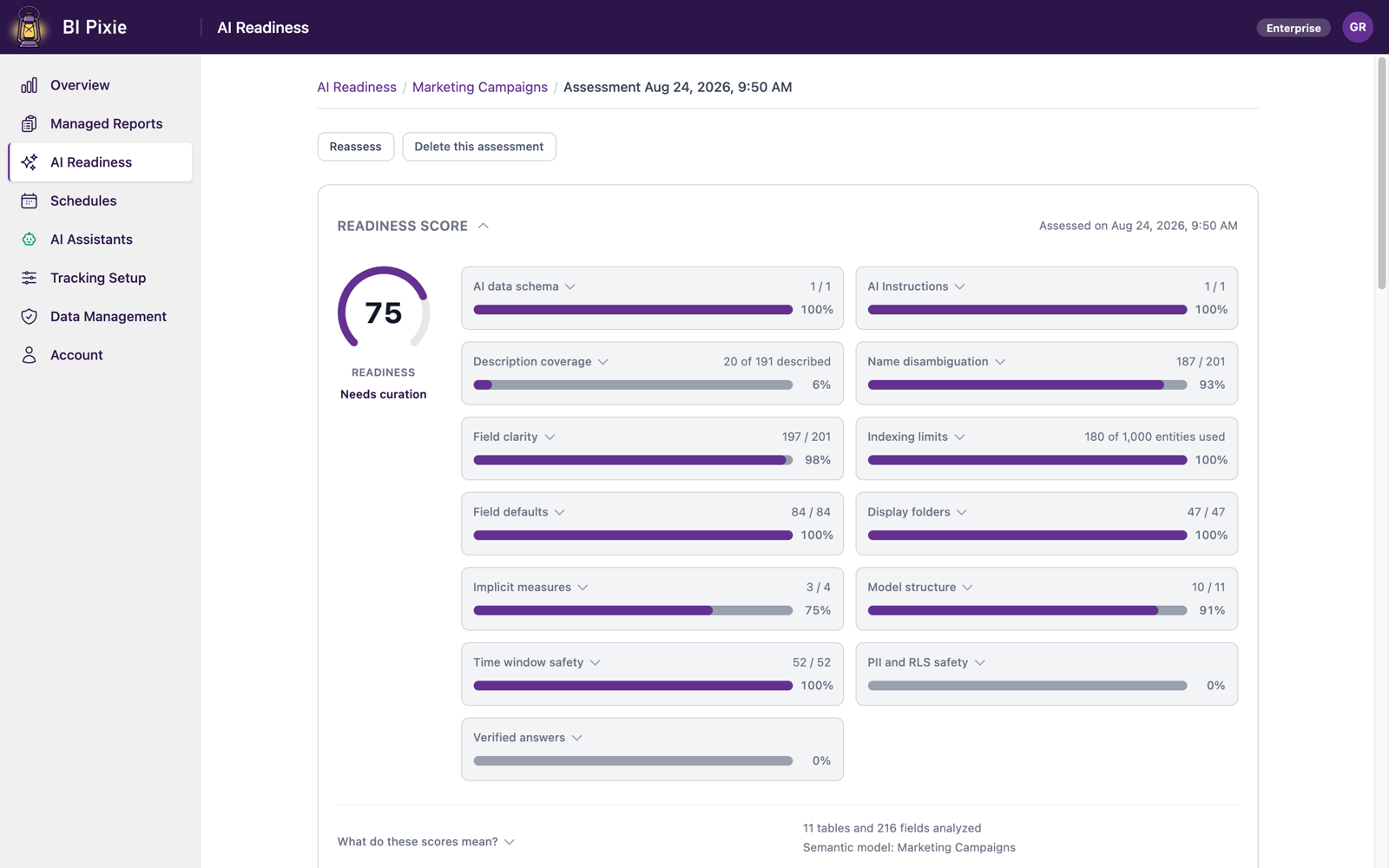
What BI Pixie checks in a semantic model
BI Pixie shows how each of these contributes to a semantic model's AI Readiness, so you know which fixes are worth making first.
- Description coverage
- Name disambiguation
- Field clarity
- AI data schema
- AI Instructions
- Indexing limits
- Semantic model structure
- Time window safety
- PII and RLS safety
- Field defaults
- Display folders
- Implicit measures
Getting started
The first AI Readiness assessment is free, for up to 500 semantic models and data agents
A first look at 500 distinct items, semantic models and data agents together, is included on every plan, paid or free. The Free plan also covers one tracked report, one tracked semantic model or data agent, and one benchmark run on your tracked semantic model. Paid plans are priced by the number of items you track, with no usage meters and no overage charges. Building a benchmark is included on every plan, and paid plans include more benchmark runs.
Download the AI Readiness one-pager (PDF, one page, no form.)
Frequently asked questions
How do I prepare my data for AI in Power BI?
How do you measure AI readiness?
Can Power BI be used with AI?
Why does Copilot give wrong answers?
How do you test whether Copilot or a Fabric data agent answers correctly?
Find out whether your semantic models are ready for AI
The first assessment is free for up to 500 semantic models and data agents, so you can find out where you stand before you commit anyone's time.