Claude, Meet Your Power BI Data
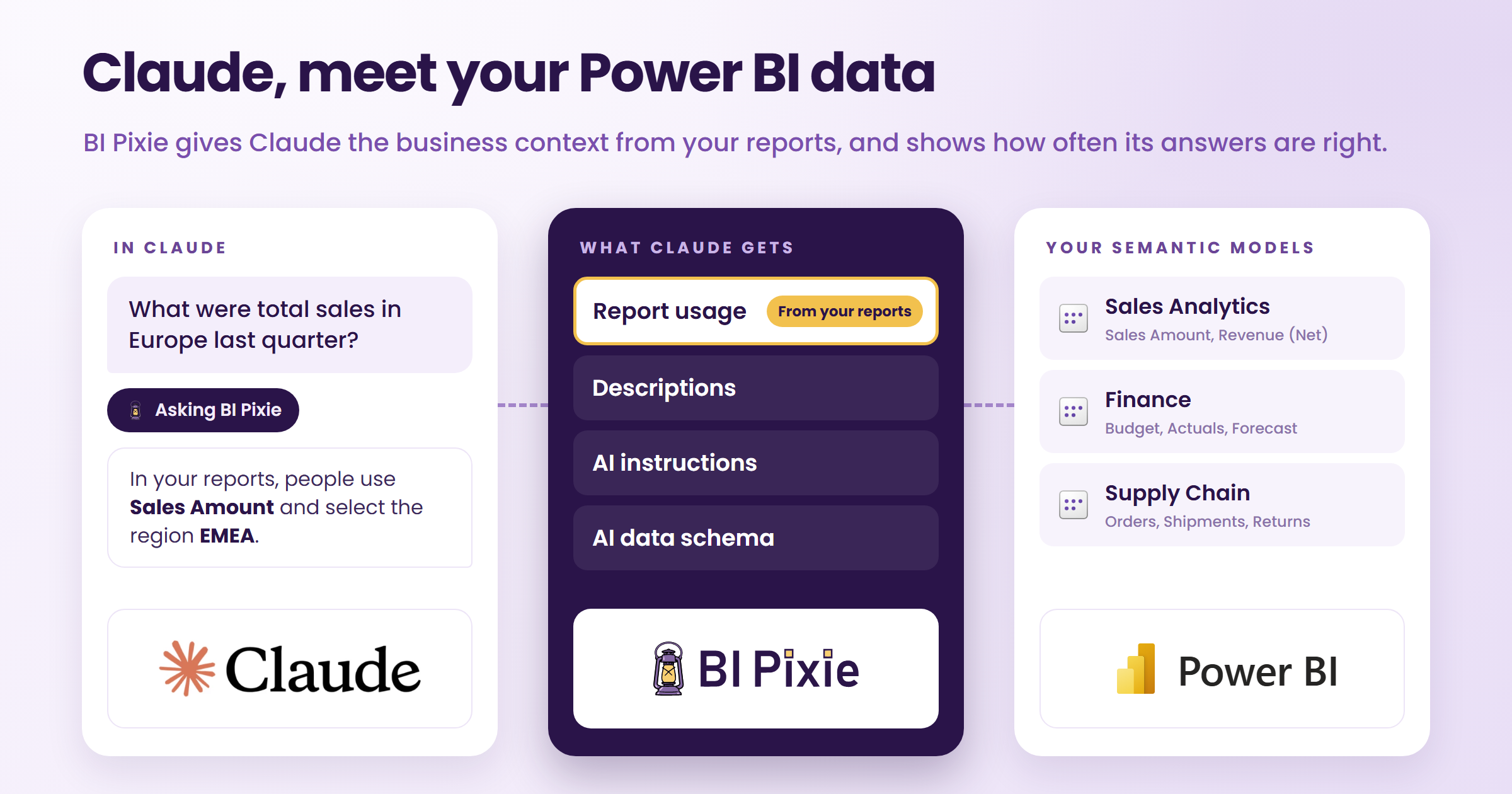
What if Claude could answer questions about your Power BI data with everything your team already prepared for Copilot, and with a little help from the people who know your data best: the people using your reports?
Data analysts already work with Claude. In Anthropic’s Economic Index report of June 2026, 82% of the Claude conversations that produced database queries were work-related, and in the Claude apps, Claude’s work on data and spreadsheets leaned toward financial modeling and dashboards. On October 8, 2026, Anthropic released Claude Dashboards in beta: live dashboards that Claude builds from a question asked in plain language, with the query behind every number one click away. Within days, Power BI practitioners were trying Claude Dashboards on their own semantic models and asking what it means for Power BI.
For Power BI data, the best source for Claude is the semantic model. More than 22 million Power BI semantic models are in use every day, according to Microsoft, and each one already holds what a correct answer depends on: the measures the business agreed on, the relationships between tables, and row-level security. A team that prepares a semantic model for AI adds more: descriptions of each measure, AI instructions on what business terms mean, and an AI data schema that names the fields AI may answer from. BI Pixie’s AI Readiness helps your team with that work. Copilot and Fabric data agents read that preparation. Until now, Claude did not.
With the new BI Pixie connector in Claude, Claude finds and queries your Power BI semantic models with the same preparation, so the optimizations your team made for Copilot and Fabric data agents now reach Claude too. Claude also gets the context of how people use your reports.
As more people ask Claude about the numbers behind Power BI reports, organizations need to know whether Claude reads the data with the right business context, and how often it gets the number right. In most of them, that responsibility sits with the BI team.
With BI Pixie, your BI team can measure how accurately Claude answers on your own semantic models, beside Copilot and your Fabric data agents, and see which business context helped Claude answer. That measurement does not stop at launch. Each time a semantic model, its AI instructions or its report usage changes, you rerun the same benchmark, and BI Pixie compares the answers question by question. You catch a regression before people act on a wrong number, and you see which optimizations improve Claude’s accuracy.
BI Pixie brings something new to two groups who depend on Claude’s answers about Power BI data. Your BI team gets evidence of how accurately Claude answers, before and after every change. Your data analysts get answers built on the business context your team prepared and on how people use your reports, right in their Claude conversations.
Two ways BI Pixie helps with Claude
| Measure how accurately Claude answers | Ask Claude about your Power BI data | |
|---|---|---|
| Who it is for | BI teams responsible for the numbers people act on. | Analysts and business users who ask Claude about the numbers behind Power BI reports. |
| What BI Pixie does | BI Pixie benchmarks Claude on your own semantic models, beside Copilot and your Fabric data agents, and compares the runs after every change. | Through the BI Pixie connector, Claude finds and queries your semantic models with your descriptions, AI instructions and AI data schema, and with how people use your reports. |
| What you get | An accuracy score, regressions caught after each change, and evidence of which optimizations help. | Answers built on the measures your business agreed on, with Claude’s choice explained. |
Claude’s answers, put to the test
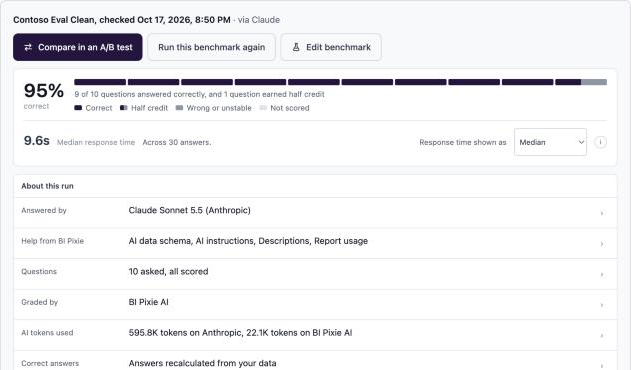
BI Pixie benchmarks already measure how accurately Copilot, Fabric data agents and generic AI agents answer on your semantic models. BI Pixie builds the questions from your business domains and report visuals, and you can review and edit them before a run. BI Pixie calculates the correct answer to each question from your own data, using its own DAX queries, and grades every answer against it with your AI, the AI you set in AI setup.
What is new is Claude. With the BI Pixie connector, you can now put the real Claude through the same benchmark: Claude answers your questions with BI Pixie’s tools, the way it answers your analysts, and you see how often its answers hold up across the questions your business asks.
Each run of Claude appears in AI Readiness alongside your other benchmarks and A/B tests. On the same semantic model, you can compare Claude with Copilot, Fabric data agents, and any other AI you have tested.
You can run a Claude benchmark in two ways. In BI Pixie, you keep the conditions the same on every run: Claude answers through Anthropic’s service with your own Claude API key, and you choose the context Claude gets from BI Pixie. In the Claude app, you test the Claude your people use, with their own settings and connectors, within your Claude plan and with no Claude API key.
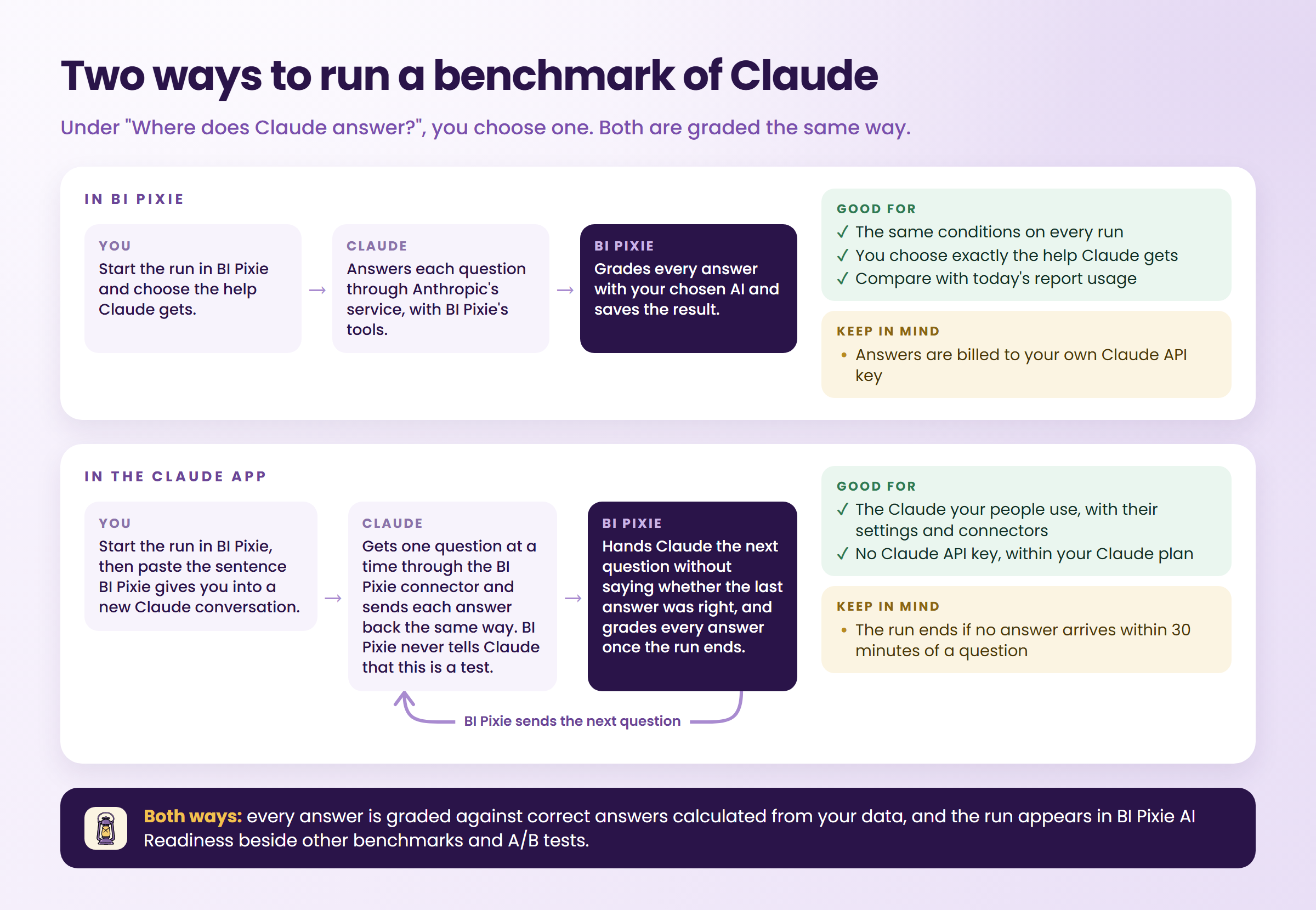
Use the run in BI Pixie to isolate the effect of specific context. Use the Claude app run to evaluate the experience your users have.
You choose the way, and the help Claude gets from BI Pixie, when you set up the run.
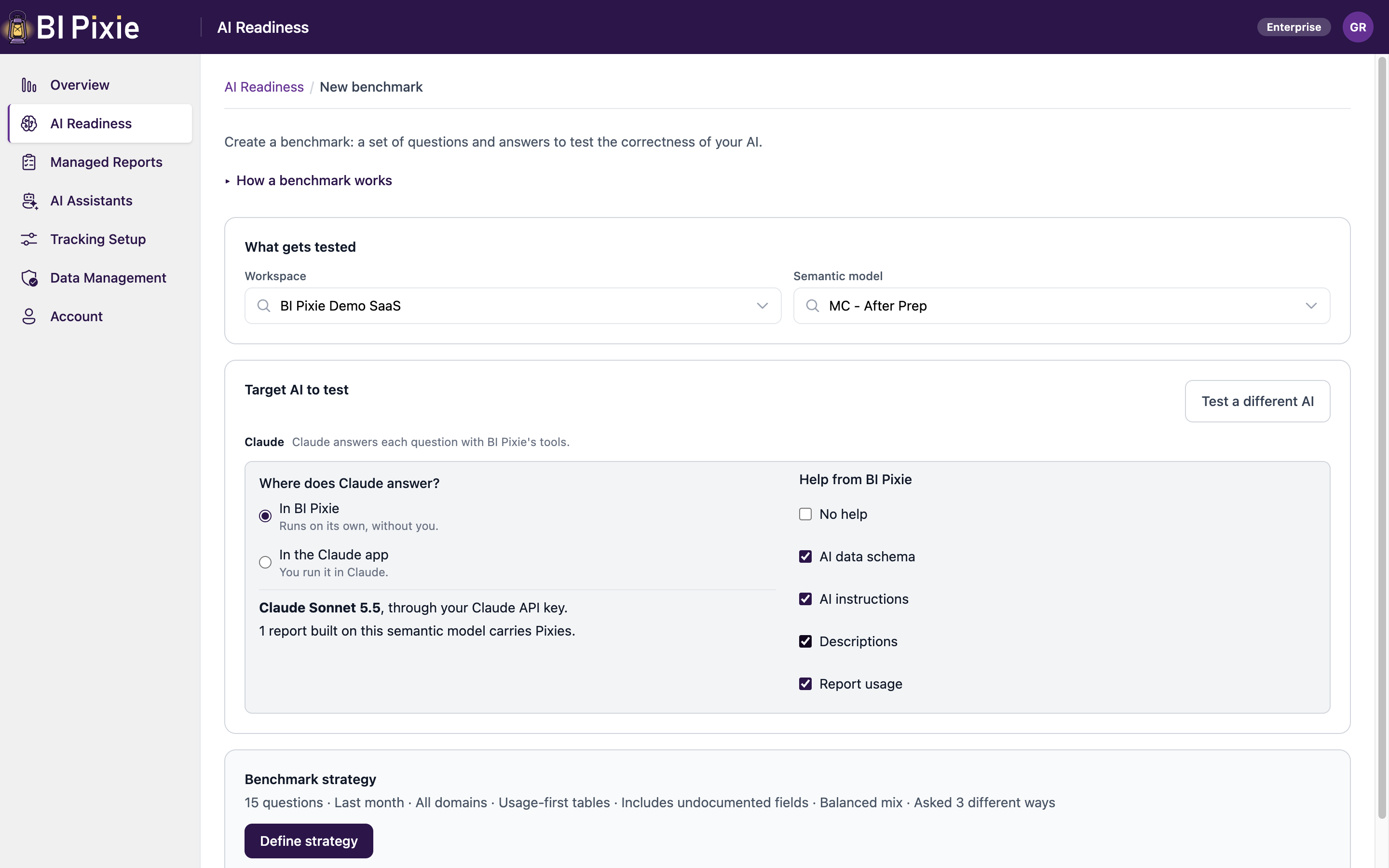
The user guide explains both ways, step by step.
What improves, and what slips, as your semantic models change
Your semantic models keep evolving. Measures change. Descriptions improve. AI instructions get revised.
Now you can measure what each change to a semantic model means for Claude’s answers.
You rerun a benchmark, and BI Pixie compares the results question by question. When you select Compare in an A/B test on a result, BI Pixie keeps the earlier run as side A, as it was, and side B is a new run.
Report usage can evolve, too. As people use your reports, BI Pixie gathers more evidence about the fields and values they use. When report usage has grown since a run of Claude in BI Pixie, you can select Compare with today’s report usage, and BI Pixie asks Claude the same questions with the latest report usage in a new A/B test.
In that A/B test, you can see whether today’s report usage improves Claude’s score, where Claude’s answers change, and which questions still need attention.
Claude gets more than a list of measures
Your analysts meet Claude one question at a time, and BI Pixie changes what Claude knows when it answers each one.
You ask Claude for “total sales by year.” Your semantic model has three plausible measures: Revenue, Revenue (Net), and Sales Amount.
Which one should Claude use?
Your team may already have settled that question for Copilot, with a description that marks Revenue (Net) as the finance figure, or an AI instruction that says “sales” means Sales Amount. Through BI Pixie, Claude reads the same descriptions, follows the same AI instructions as Copilot in Power BI does, and leaves out every field your team excluded from the AI data schema.
Your reports hold one more clue, one that nobody has to write down: which fields people actually use.
BI Pixie brings the usage of your reports to Claude, and Claude can check it on its own. In the example below, someone asks which sold more in 2024, France or the Netherlands. The semantic model has two country fields: the customer’s country and the store’s country. Before writing a query, Claude checks with BI Pixie, and rather than guess, it asks which one the person means, noting that people use the customer’s country most often in reports for France.
Claude reads both, the preparation your team writes and the evidence of how people use your reports, to interpret the next business question.
![A Claude conversation on claude.ai. Someone asks: Which sold more in 2024 in Contoso Eval Bloated Dev, France or the Netherlands? Claude shows a step named Asking a question, then asks: Should France and the Netherlands be the customer's country or the store's country? It offers two choices. The first is Customer country, Customer[Country], used most often in reports for France. The second is Store country, Store[Country], where the sale was made. A box below offers Something else, and a Skip button.](/images/blog/claude-asks-which-country.png)
Claude, connected to the business context behind your reports
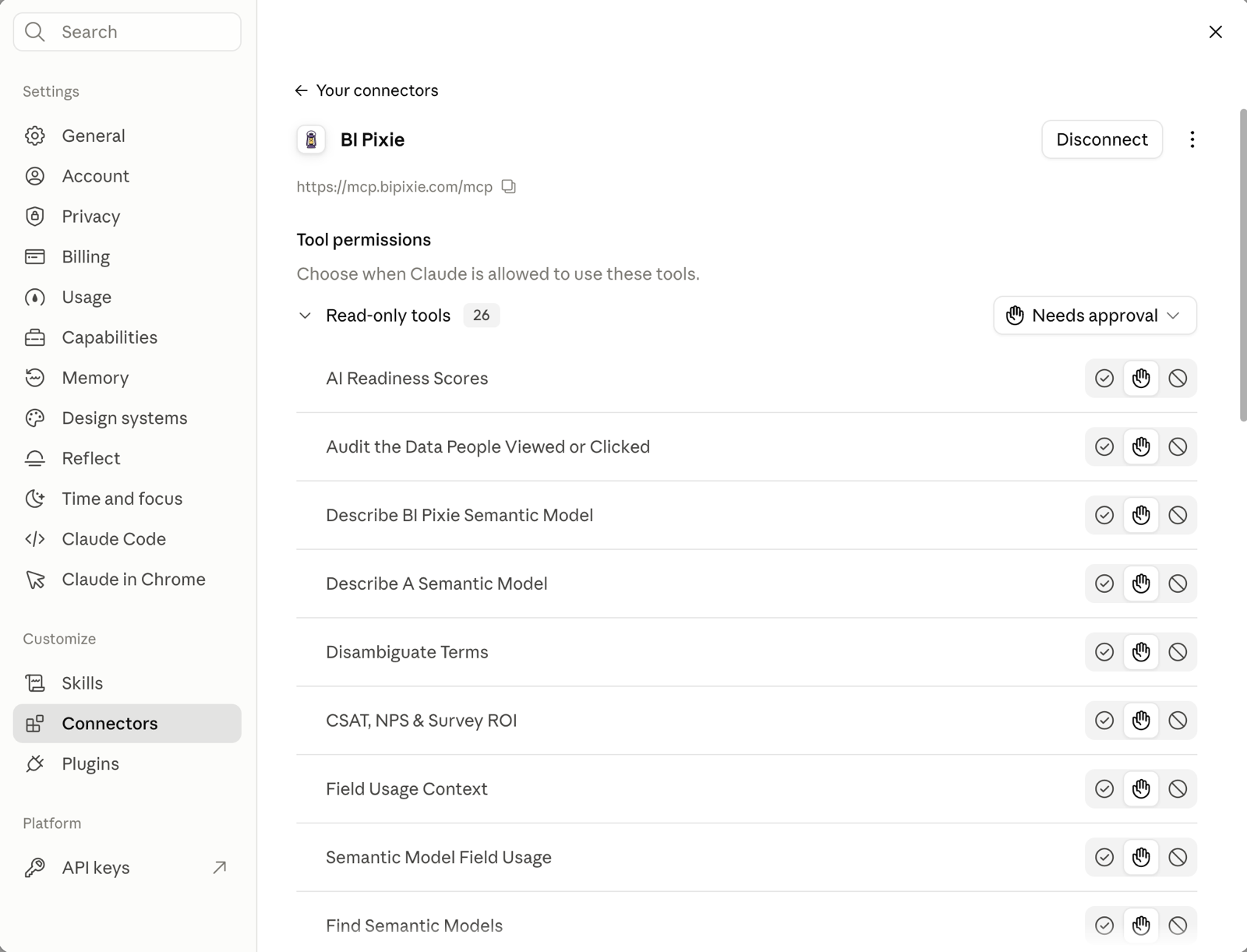
BI Pixie is now a connector in Claude. Once you add it, Claude can:
- Find, describe, and query your Power BI semantic models.
- Explore which fields and filter values people use in the reports built on those semantic models.
- Read your semantic model descriptions, with AI instructions and AI data schema also available to people who may edit the semantic model.
- Read your BI Pixie account, AI Readiness results and benchmarks, and answer a benchmark of Claude that you start in BI Pixie.
You add BI Pixie once, in Claude’s Connectors settings, sign in with your Microsoft work account, and start asking questions.
Report usage context comes from Pixies: invisible tracking pixels native to Power BI that you add to the reports you choose. BI Pixie records which fields appear in the visuals people open and which filter values they select. Only BI Pixie knows which fields your people actually query.
BI Pixie collects viewer user names only when you turn on Capture user identity, and then you choose whether it keeps the email address, a masked ID or nothing. Until then, BI Pixie counts viewers by a masked IP address.
Add the BI Pixie connector to Claude →
Toward governance for Claude on your Power BI data
With Claude Dashboards, anyone can turn a question into a live, shared view of company data. That is the opportunity, and it is also why BI teams will need governance for Claude: a number on a dashboard is only as reliable as the semantic model behind it and the way Claude reads it.
That governance starts with two things BI Pixie gives your BI team today. The first is shared business context. When people ask Claude through BI Pixie, Claude works from the context your BI team controls, the descriptions in your semantic models and the report usage BI Pixie gathers, so an improvement your team makes reaches everyone who asks. The second is evidence. With a benchmark, your BI team sees how accurately Claude answers on your semantic models, beside Copilot and your Fabric data agents, and catches a regression after each change.
We are working on the next steps. One is a record of which Claude dashboards read which semantic model, and how people use them, so your BI team can see where Claude’s answers reach the business, as it sees today how people use your Power BI reports.
Try Claude and BI Pixie on the semantic model your team knows best
Start with a semantic model your team uses regularly:
- Sign in to BI Pixie and add Pixies to the reports built on that semantic model.
- Run your first Claude benchmark and explore the results.
- Connect BI Pixie to Claude and ask a familiar business question.
A question your team knows well makes the best first test, because your team can tell at once whether Claude chose the field the business means.
Your team has already taught your semantic models how your business reads its data, and the people using your reports show it every day. With BI Pixie, Claude can now use both to answer the next question.