
A Copilot that answered correctly last quarter can answer wrongly today.
You put the work in. Your team assessed the semantic model, wrote the descriptions, and added the AI Instructions. Copilot or your Fabric data agent started answering well, people stopped double-checking it, and your organization called the rollout a success.
Your rollout was three months ago, and your team has changed the semantic model a hundred times since. Nobody has rechecked the answers, and nobody would know if Copilot or your Fabric data agent had stopped answering correctly.
Why nobody notices when the answers get worse
Ordinary software tells you when it fails. An agent answers every question you ask it, whether or not it understood what you meant. There is no error when it picks the wrong measure, no exception when it invents a column, no alert when a renamed field silently changes what a question means. It answers confidently, in a full sentence, and the only person who can catch it is someone who already knew the right number and bothered to look.
Your team keeps changing the semantic model. They add measures, rename columns, drop a description during a refactor, and introduce a helper table that looks like a fact table. None of that breaks a report, because the report author pinned the fields they meant, but every one of those changes can break an answer.
Your team never sees an incident, because nothing has gone down. You find out weeks later, from a stakeholder who says the numbers cannot be right, and you have no way to tell which change caused it.
What the same benchmark tells you, run after run
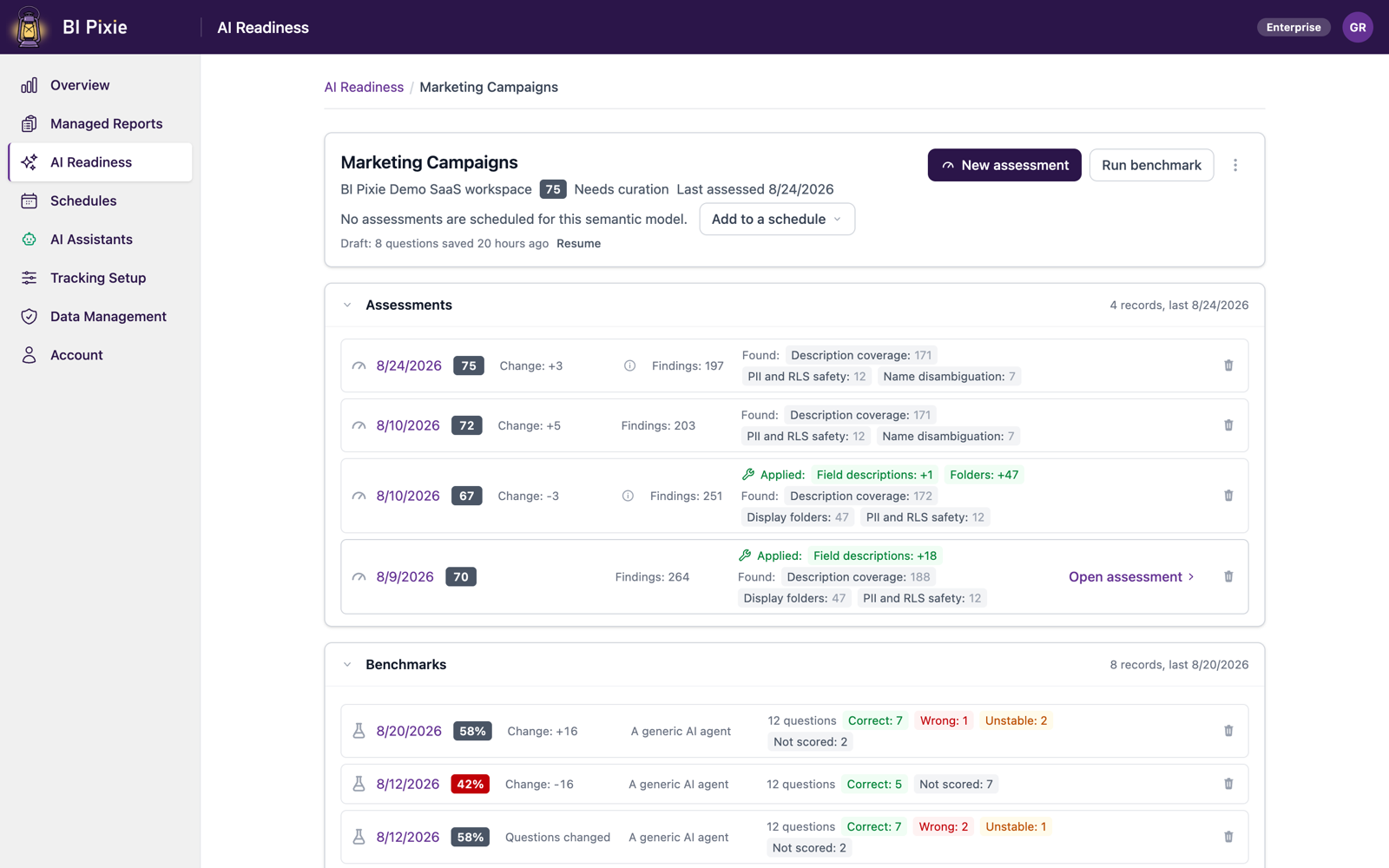
BI Pixie makes testing your AI repeatable. You run the same benchmark after every change to your semantic model, and you learn about a drop in accuracy from a number rather than from a complaint.
- A baseline you can trust
- BI Pixie builds a benchmark whose correct answers are computed live in DAX from your own data. You can review every question before the first run, and select Check answer on any question to see the correct answer BI Pixie computes for it.
- You run the identical benchmark after every change to the semantic model
- The same questions and the same grading make each comparison honest. When your team adds a measure or deletes a description, BI Pixie shows you a score that moved and names every question the AI answered wrong.
- A fixed answer key, or answers recomputed from today's data
- You choose: grade each run against the answers saved when the benchmark was created, or recompute them from current data before every run. BI Pixie tells you in the result when the data behind a question has changed since the answers were saved, and offers to update those answers to your current data.
- History you can compare
- BI Pixie keeps every run per semantic model with its change from the run before, and groups the runs by the AI you tested, because a Copilot benchmark and a Fabric data agent benchmark are not one trend. BI Pixie marks a benchmark you edited, so you never read a run of edited questions as a comparison with earlier runs.
- AI Readiness assessments between your benchmark runs
- On the Enterprise plan, BI Pixie runs AI Readiness assessments on a schedule you set between your benchmark runs. When the AI Readiness score drops sharply, you know that the metadata an agent reads has gotten worse, and that the benchmark is worth running again sooner.
Download the AI Readiness one-pager (PDF, one page, no form.)
What it takes to set up
- 1 Connect your Power BI workspace and open AI Readiness.
- 2 Assess the semantic model, and apply the fixes you agree with.
- 3 Generate a benchmark, review the questions, and check the computed answer for any of them.
- 4 Run it to set your baseline, then re-run after each significant change to the semantic model.
Worth knowing: Assessment needs Contributor or higher on the workspace, and the assessment itself writes nothing. BI Pixie changes a semantic model only when you review an optimization and choose to apply it. Benchmarking through a generic AI agent needs no Fabric capacity, and it needs an AI you connect yourself, such as Microsoft Foundry, OpenAI, or Anthropic. The other two options do need the workspace to be on a Fabric capacity: the query engine behind Copilot refuses to answer without one, and your own Fabric data agent needs a paid capacity. Ranking findings by real usage needs BI Pixie to track the reports built on your semantic model and to have recorded enough interactions, and that usage data is the reason the ordering reflects your organization rather than a generic checklist. BI Pixie collects viewer user names only when you turn on Capture user identity, and until then it counts viewers by a masked IP address.
Related reading
Other use cases
- Build your AI plan for Power BI from how people use each report today.
- Copilot gives wrong answers when your semantic model is not ready for it.
- Plan a migration to Microsoft Fabric, and prove that it worked.
- Power BI usage metrics record that a report was opened, not what happened next.
- Show the return on your Power BI investment with how people use and value each report.
- Power BI usage metrics do not cover your embedded reports.
- Collect satisfaction scores from Power BI users inside the report, not in a separate survey tool.
- Check whether row-level security in Power BI let anyone see data it should have hidden.
- Find the slow Power BI reports that people depend on, and fix those first.
See the data from your own reports
Add Pixies to a report and watch real interaction data arrive. BI Pixie starts free, and the Free plan does not expire.