
Show the return on your Power BI investment with how people use and value each report.
Your organization spends heavily on Power BI every year: licenses, the internal staff who build and maintain reports, and the contractors who fill the gaps.
At budget time someone asks what that spending returned. You have many reports and a slide of page views, and you need an answer that holds up when finance reads it.
Why the return on Power BI is hard to measure
In a count of page views, you cannot tell a report opened a hundred times and closed within seconds from a report people work in for half an hour every day.
Only the people who read a report know whether it saved them time or supported a decision worth money. A return you can defend needs their answers as well as their clicks.
Nobody can collect usage data and viewer estimates by hand across many reports, and Power BI usage metrics report only the views of each report and page.
What BI Pixie measures for each report
BI Pixie adds Pixies, invisible tracking pixels native to Power BI, to the reports you choose, and can add a survey page to each one. You see engagement and the value your report viewers estimate in one dashboard, for every report and every workspace.
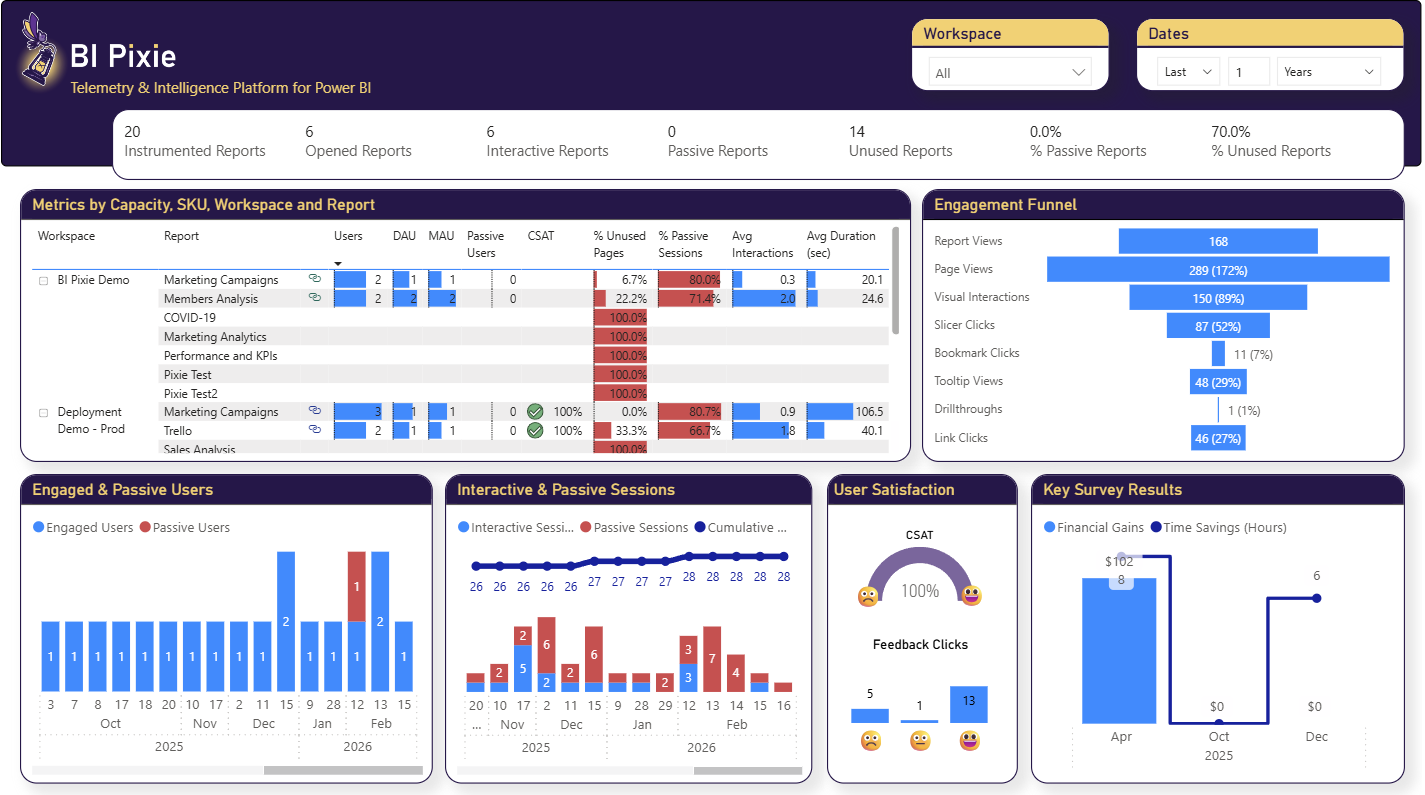
- Monthly active users for every report
- You see daily and monthly active users for every report and workspace, with engaged users apart from passive users who only view.
- Engaged sessions and time spent
- You see average interactions per session, the share of sessions that hold only views, and average session duration, so you can tell a report people work in from a report they glance at.
- Hours saved and value, as estimated by report viewers
- With an embedded survey page, BI Pixie asks your report viewers how many hours a month each report saves them and what monthly value it brings them. You see the totals and averages for each report and across everyone who answered.
- Satisfaction and Net Promoter Score
- BI Pixie calculates a satisfaction score for each report from its feedback controls, and a Net Promoter Score from its survey page, and shows both beside how people use that report.
- Reports nobody uses
- You see the reports nobody opened and the pages nobody visits, so you can retire them and move your team's time to the reports people depend on.
What it takes to set up
- 1 Connect your Power BI workspace and pick the reports you want to measure.
- 2 Add Pixies, and turn on the survey page in tracking setup.
- 3 Let people use the reports as normal.
- 4 Review engagement, satisfaction, and survey results for each report in the BI Pixie Dashboard.
Worth knowing: Adding Pixies needs the Contributor, Member, or Admin role on the workspace. Embedded surveys and feedback controls are included with the Free, Pro and Enterprise plans. When you add Pixies, BI Pixie collects viewer user names only if you turn on Capture user identity in Tracking Setup, which lets you analyze behavior per person. Until then, it counts viewers by a masked IP address. The survey page asks each respondent whether to include their email address or stay anonymous, and you can turn that question off in tracking setup.
Related reading
- BI Pixie metrics reference
- Embed user surveys
- Embedded Surveys in Power BI
- Measuring the Effectiveness of Your Power BI Dashboards
Other use cases
- Build your AI plan for Power BI from how people use each report today.
- Copilot gives wrong answers when your semantic model is not ready for it.
- A Copilot that answered correctly last quarter can answer wrongly today.
- Plan a migration to Microsoft Fabric, and prove that it worked.
- Power BI usage metrics record that a report was opened, not what happened next.
- Power BI usage metrics do not cover your embedded reports.
- Collect satisfaction scores from Power BI users inside the report, not in a separate survey tool.
- Check whether row-level security in Power BI let anyone see data it should have hidden.
- Find the slow Power BI reports that people depend on, and fix those first.
See the data from your own reports
Add Pixies to a report and watch real interaction data arrive. BI Pixie starts free, and the Free plan does not expire.