
Build your AI plan for Power BI from how people use each report today.
Your leadership has asked for a plan for AI across your Power BI reports, whether that means Copilot, data agents in Microsoft Fabric, or other AI tools. You own many reports, and each one has an audience that depends on it.
You need to decide which reports to keep as they are, which to augment with AI, and which to retire. Every one of those decisions changes somebody's working day, and you have to defend each one to the people it affects.
Why an AI plan is hard to build from page views
In a count of page views, a report that people open every morning and work in for twenty minutes looks the same as a report opened for five seconds and closed. If you rank reports by views, you can put your AI investment into the wrong reports.
Heavy use of a report does not tell you whether AI can answer from the semantic model behind it. Copilot and Fabric data agents decide how to answer from the semantic model's metadata alone: table and column names, descriptions, relationships, and the instructions you leave them. A semantic model can serve its reports well and still lead Copilot or a Fabric data agent to a wrong answer.
A wrong choice costs you in both directions. An AI investment in a report nobody works in is wasted, and retiring a report people depend on disrupts their work.
What BI Pixie gives you to build the plan
BI Pixie adds Pixies, invisible tracking pixels native to Power BI, to the reports you choose, and assesses the semantic models behind them. With engagement, AI Readiness, and benchmark results side by side, you have evidence for each decision to keep, augment, or retire a report.
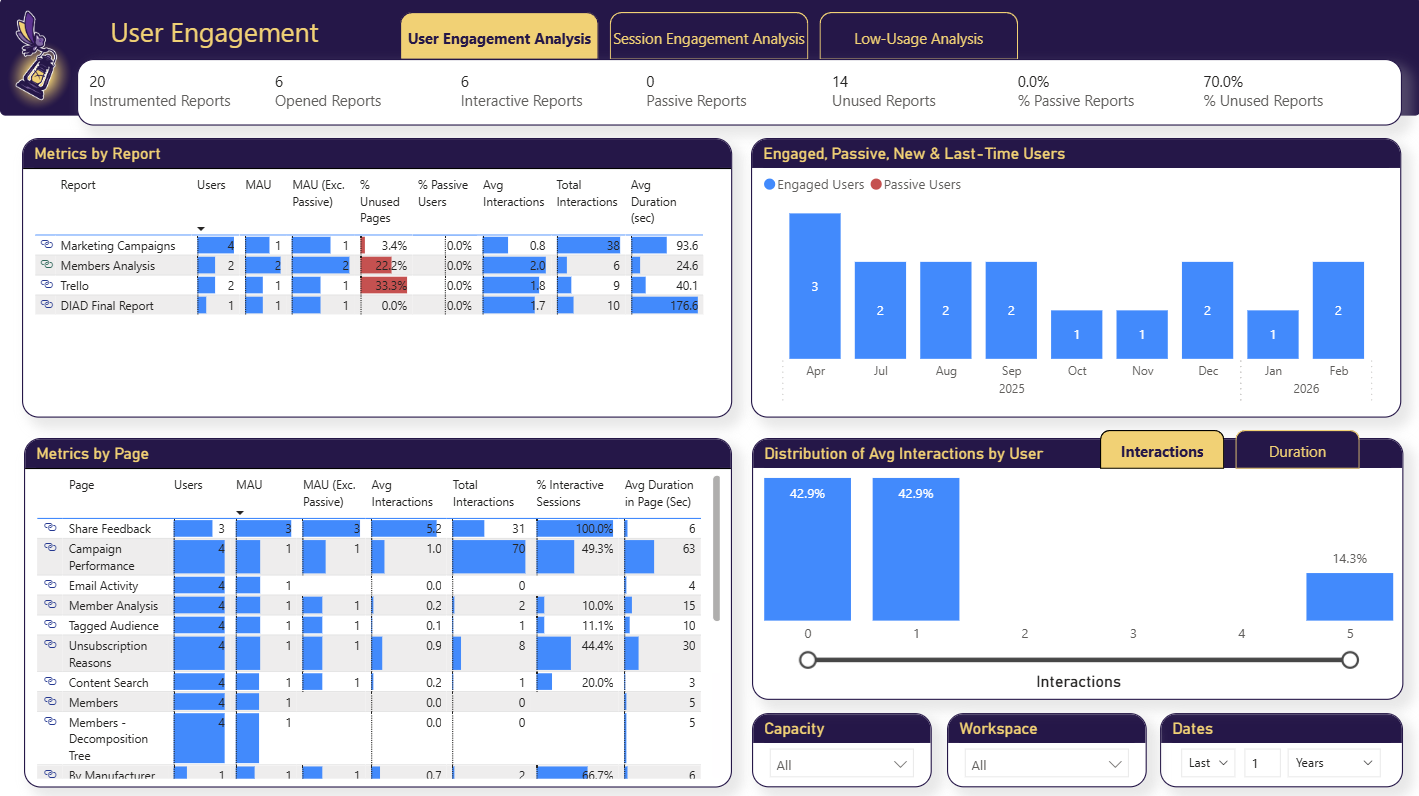
- Which reports people work in
- For every report you track, you see monthly active users, the sessions with interactions apart from the sessions that hold only views, average interactions per session, and session duration. You can tell the reports people work in every day from the reports they open and close.
- Candidates to retire
- You see the reports nobody opened, the pages nobody visits in reports that are still in use, and the least active reports and pages. Those are your first candidates to retire.
- Where people struggle
- You see which visuals people click, which visuals they never touch, and how long their sessions last on each page, so you can find the reports where people work hard to reach an answer. You turn visual-level click tracking on in tracking setup, because it is off by default.
- The AI Readiness of each semantic model
- BI Pixie assesses the semantic models behind your reports for Copilot and for Fabric data agents, so you know which semantic models are ready for AI and what to fix first. The first assessment is free on every plan, for up to 500 semantic models and data agents.
- A benchmark before you commit
- BI Pixie benchmarks Copilot or your Fabric data agent on real business questions, graded against correct answers calculated from your own data. You run the same benchmark after every change, and BI Pixie compares it with the run before.
- Fixes ranked by real usage
- When BI Pixie tracks the reports built on a semantic model, it orders the assessment findings by what your people actually click, so your team fixes first what the most people will notice.
Download the AI Readiness one-pager (PDF, one page, no form.)
What it takes to set up
- 1 Connect your Power BI workspace and pick the reports you want to plan for.
- 2 Add Pixies, and let people use the reports as normal.
- 3 Compare engagement across your reports in the BI Pixie Dashboard to decide what to keep, augment, and retire.
- 4 Assess the AI Readiness of the semantic models behind the reports you keep, and benchmark Copilot or your Fabric data agent on them.
Worth knowing: Adding Pixies needs the Contributor, Member, or Admin role on the workspace, and assessment needs Contributor or higher. Assessment writes nothing to your semantic model and runs on BI Pixie's infrastructure, not on your Fabric capacity. A benchmark through a generic AI agent needs an AI you connect yourself, such as Azure AI Foundry, OpenAI, or Anthropic, and works with no Fabric capacity at all. Benchmarking through the query engine behind Copilot needs the workspace on a Fabric capacity, and benchmarking your own Fabric data agent needs a paid capacity. BI Pixie collects viewer user names only when you turn on Capture user identity, and until then it counts viewers by a masked IP address.
Related reading
- AI Readiness
- AI Readiness guide
- BI Pixie Dashboard guide
- Introducing AI Readiness in BI Pixie
- How to differentiate between passive and active Power BI users
Other use cases
- Copilot gives wrong answers when your semantic model is not ready for it.
- A Copilot that answered correctly last quarter can answer wrongly today.
- Plan a migration to Microsoft Fabric, and prove that it worked.
- Power BI usage metrics record that a report was opened, not what happened next.
- Show the return on your Power BI investment with how people use and value each report.
- Power BI usage metrics do not cover your embedded reports.
- Collect satisfaction scores from Power BI users inside the report, not in a separate survey tool.
- Check whether row-level security in Power BI let anyone see data it should have hidden.
- Find the slow Power BI reports that people depend on, and fix those first.
See the data from your own reports
Add Pixies to a report and watch real interaction data arrive. BI Pixie starts free, and the Free plan does not expire.