
BI Leaderboard, producers and consumers
With Admin Monitoring on, BI Pixie reads your Power BI tenant's activity, so the dashboard can tell the people who build reports and semantic models apart from the people who use them. Two pages are built on that:
- BI Leaderboard ranks the people who build, by how much use their reports and semantic models get.
- Producers & Consumers compares the people who build with the people who use, across capacities, workspaces and reports.
To turn Admin Monitoring on, see Admin Monitoring. Both pages are in the installed BI Pixie Dashboard report, and in the Business Outcomes report in the dashboard's Reports folder.
Producers and consumers
A producer, called a developer on BI Leaderboard, is a person who created or changed a report or a semantic model in the period. A consumer is a person who viewed, exported or otherwise used one. One person can be both.
These figures come from your tenant's activity, so they cover every report in the estate, not only the reports with Pixies. Until BI Pixie has collected any activity, the tables and charts on both pages read No tenant activity has been collected yet. Business Outcome by Semantic Model and Report comes from the tenant scan instead, so until the first scan it reads No tenant scan has run yet.
How the headline cards read
The cards cover the last 30 days and compare them with the 30 days before, so the Dates slicer does not move them.
BI Leaderboard
BI Leaderboard answers the question: whose work gets used, and how much?
The cards
- Developers counts the people who created or changed a report or a semantic model.
- Reports modified counts the reports that were created or changed.
- Semantic models modified counts the semantic models that were created or changed.
- ROI score estimates the return on the development work. It rises with consumer activity for each development activity, with the number of consumers, and with how often they come back. It also rises with the share of data exports that use Analyze in Excel. It falls as the reports get more complex. A higher score is better.
Below the cards
With the tabs under the cards, you move between two views of the leaderboard:
- Developer Leaderboard: All Business Outcome Metrics lists each developer with the use their work gets: interactive sessions, session duration, the share of monthly users who come back daily, and satisfaction. With the slicer of business measures beside it, you choose the measure the other visuals compare by.
- Developer Leaderboard: Design Attributes lists each developer with how their reports and semantic models are built: the complexity score, bookmarks, measures, calculated columns and columns in table visuals.
Beside them, Metric by Semantic Model Endorsement and Business Outcome by Semantic Model and Report show the chosen measure for each developer and each semantic model. Activities lists what was done, and when. Developer Activities & Business Metric Over Time draws the development work against the chosen measure, month by month.
What to do with it
- Developers whose work gets heavy, repeated use are good candidates to mentor others or to own shared semantic models.
- A developer with a high complexity score and low use may be building more than people need. The Design Attributes view shows where the complexity comes from.
- When development work rises and the chosen measure does not, the new work is not reaching anyone. The chart over time shows when the two parted.
Producers & Consumers
Producers & Consumers answers the question: how many people build, how many only use, and where?
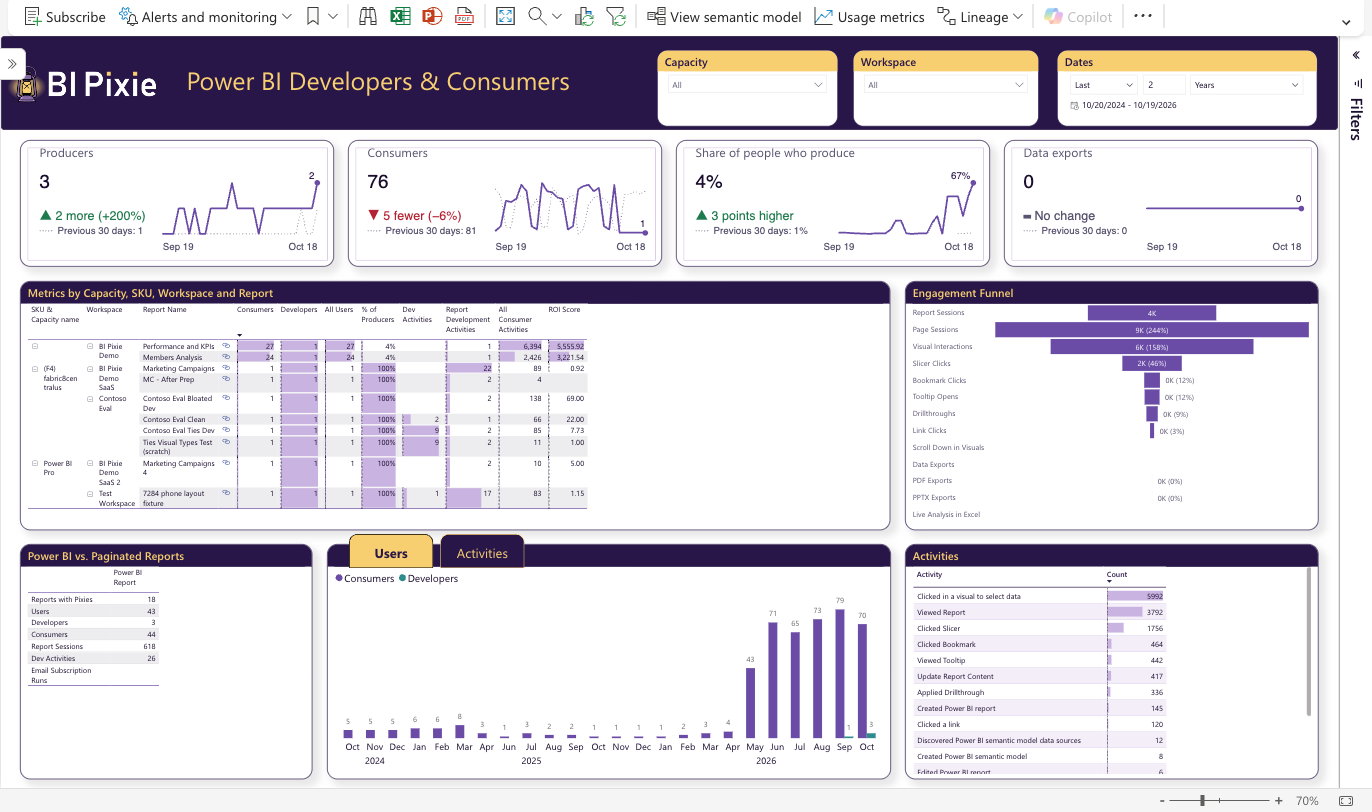
The cards
- Producers counts the people who created or changed a report or a semantic model.
- Consumers counts the people who used a report.
- Share of people who produce divides the producers by everyone active in the period, from any source. A producer who used no report still counts among the producers and among everyone active.
- Data exports counts the times people exported data from a report.
Below the cards
- Metrics by Capacity, SKU, Workspace and Report breaks producers, consumers, their activities and the ROI score down from capacity to report. Expand a row to go a level deeper.
- Engagement Funnel shows how consumers go past viewing: drillthroughs, bookmark and link selections, Analyze in Excel, and exports to PDF, PowerPoint or data.
- Power BI vs. Paginated Reports compares the two kinds of report, including the runs of email subscriptions.
- Users over time and Activities over time follow producers and consumers, and their activities, month by month. Select the tabs above them to switch.
- Activities lists every activity type with its count.
What to do with it
- A rising share of people who produce usually means self-service is growing. If it rises while consumers fall, people may be building their own copies instead of using shared reports.
- Many data exports and Analyze in Excel sessions on one report suggest people need the data in another shape. A report or a semantic model built for that need may serve them better.
- A workspace with many producers and few consumers is a place to look for duplicated or abandoned work.