
Set Up Your AI for AI Readiness in Microsoft Fabric
BI Pixie works with AI in three ways, and you set up all three once for your whole account in AI setup:
- Your AI is the AI that BI Pixie uses for you. It writes the descriptions, AI instructions, folder names, and benchmark questions that BI Pixie proposes for your semantic model, and it gives a second opinion on whether a benchmark answer matches the correct answer.
- Claude API keys are the Anthropic keys that Claude answers a benchmark with in BI Pixie. You add one with Add a Claude API key, and the key you save pays for Claude's answers.
- Generic AI agents to test are the AIs that you test with a benchmark, to see how well each one answers questions about your semantic model. See generic AI agents.
Choose your AI
Your AI can be one of these:
- BI Pixie AI, AI run by BI Pixie on Microsoft Azure OpenAI, with a monthly allowance on every plan. An account that has saved no AI of its own starts on it. See Use AI Run by BI Pixie for AI Readiness.
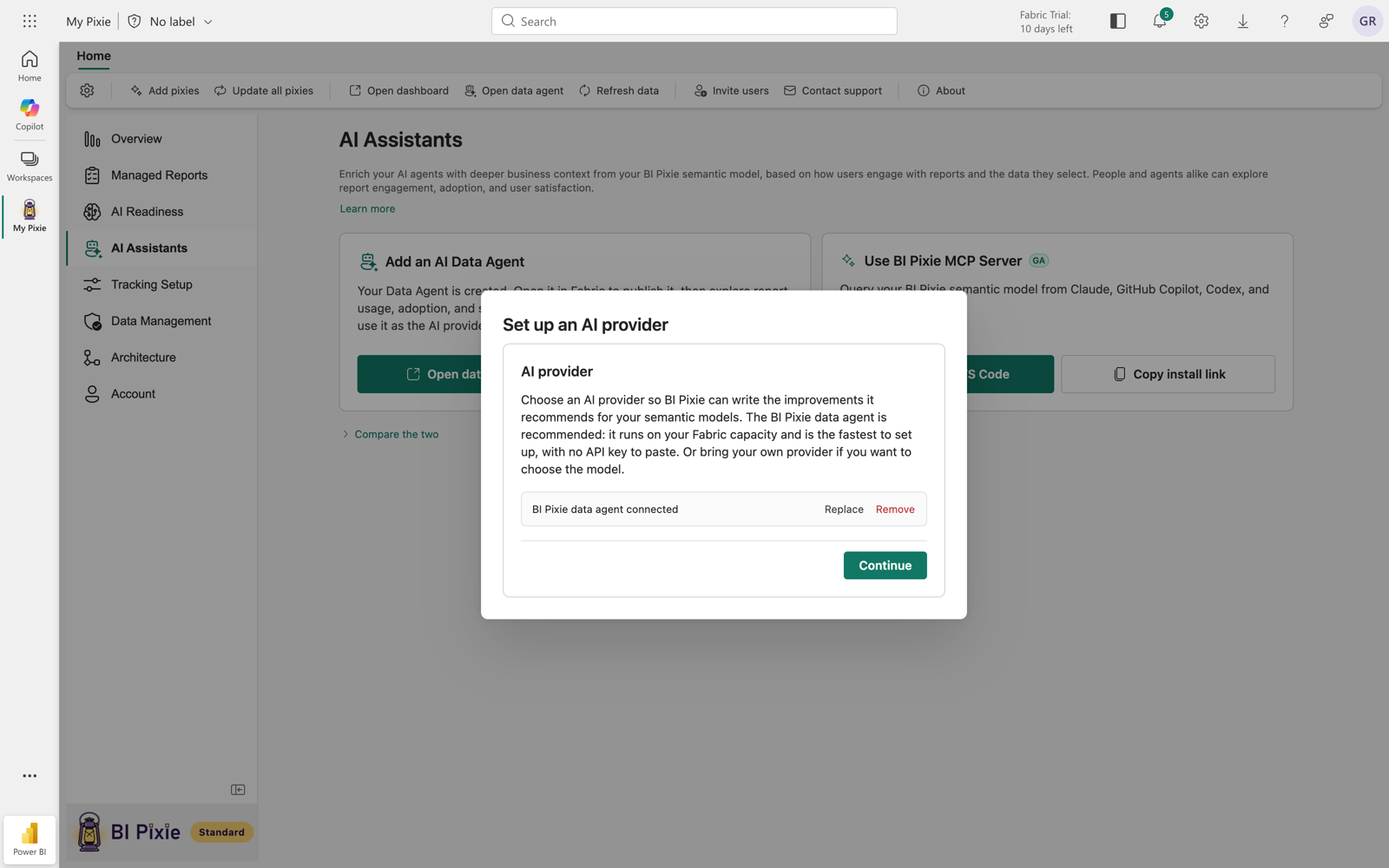
- The BI Pixie data agent, a Fabric data agent that runs on your own Fabric capacity, with no key to manage. See Use the BI Pixie data agent as your AI.
- Your own AI from Microsoft Foundry, OpenAI, or Anthropic, with your own endpoint or API key. See Use Microsoft Foundry, OpenAI, or Anthropic as your AI.
Prerequisites
- The account admin role. AI setup is an account setting, so only account admins can see and change it.
- For the BI Pixie data agent, the BI Pixie Dashboard installed in your workspace. See AI Assistants.
- For Microsoft Foundry, an endpoint and a deployment name in your own Azure tenant. For OpenAI or Anthropic, an API key.
Open AI setup
You can open AI setup from any of these places:
- On the AI Readiness page, before your AI is set up, select Set up in the callout that reads "Set up your AI to write improvements to your semantic models." After your AI is set up, select the AI setup settings icon beside the header buttons. Both open the Set up AI dialog.
- On the Account page, select the AI tab.
- On the AI Assistants page, after the BI Pixie data agent exists, select Use for optimizations on its card.
To check whether your AI is set up, look at the status light on the AI Assistants icon in the item sidebar. A screen reader announces it as "Your AI set up" or "No AI set up".
Use the BI Pixie data agent as your AI
The BI Pixie data agent runs in your workspace on your own Fabric capacity, so you have no key to manage.
- Open AI setup, and select BI Pixie data agent.
- If the BI Pixie Dashboard isn't installed, select Go to Overview and install it first. The data agent answers from the dashboard's semantic model.
- If the dashboard is installed but the data agent isn't, select Install data agent. The button shows the workspace BI Pixie installs it into, and you connect the data agent without leaving the dialog.
- Select the data agent, and then select Save.
BI Pixie queries the data agent as you, which needs your permission to query Fabric data agents. You grant this permission yourself, unless your organization's policy requires an administrator to approve it. If you haven't granted it yet, the data agent is still saved as your AI, and you can select Grant access on the banner on the AI Readiness page or on any AI Readiness card that uses your AI.
Use Microsoft Foundry, OpenAI, or Anthropic as your AI
- Open AI setup, and select Microsoft Foundry, OpenAI, or Anthropic.
- For Microsoft Foundry, enter your endpoint and deployment name, and choose Microsoft Entra ID (recommended) or an API key. To set up Microsoft Entra ID in Azure, see Connect Microsoft Foundry with Microsoft Entra ID. For OpenAI or Anthropic, enter an API key.
- Optionally, enter a Name, which is how the AI is listed wherever you choose one. If you leave it empty, the AI is listed under the name of its service.
- Select Save.
Microsoft Foundry runs in your own Azure tenant and bills your Azure subscription. OpenAI and Anthropic bill your account with that service. BI Pixie stores every credential encrypted, and every call runs on BI Pixie's servers against your own account, with BI Pixie's own prompts.
Change or remove your AI
On the row of your AI, you can select Change, Rename, Replace credential when it has a credential, or Remove.
- When you select Change and save a different AI, the AI it replaces leaves AI setup, unless it's also one of your generic AI agents to test or one of your Claude API keys. Then it stays in that list. Before you save, you see which of the two happens.
- You can select Remove only when no other AI is saved, because an account with saved AIs always has one of them as its AI. To replace your AI, select Change instead.
- You can't change the deployment of a saved AI. To use a different one, add it as a new AI, select Change to make it your AI, and then remove the old one.
- Your account has one BI Pixie data agent. After you save it, you can add only Microsoft Foundry, OpenAI, or Anthropic.
Add a generic AI agent to test
You can add several generic AI agents and test each one against your semantic model. For example, an A/B test can compare how accurately two AI models answer questions about the same semantic model.
- Open AI setup, and under Generic AI agents to test, select Add a generic AI agent.
- Choose Microsoft Foundry or OpenAI. To reuse a credential you already saved for that service, choose it, so that you don't enter a key again. For OpenAI, you can enter an AI model. If you leave it empty, BI Pixie uses its default AI model.
- Select Save.
On each row, you can select Use for optimizations to make that AI your AI, or Rename, Replace credential, or Remove. If you remove your AI from this section, it stays your AI, and you see that in the confirmation.
When you choose a generic AI agent for a benchmark, the picker lists this section's AIs, and the row of your AI reads Grades the answers. The picker also shows the BI Pixie data agent, which you can't choose there, with the reason beside it. See Choose the AI to test.
An Anthropic key is saved under Claude API keys, not as a generic AI agent: select Add a Claude API key there. A Claude API key lets you benchmark Claude in BI Pixie. That key pays for Claude's answers, and with no Claude API key saved, BI Pixie does not start that run. A run in your own Claude app needs no Claude API key. When you leave AI model empty, Claude answers with Claude Sonnet 5.5. See Benchmark Claude.
Work without your AI
You can use everything that doesn't need AI with no AI set up, and it keeps working when a call to your AI fails:
- Assessments, with the full breakdown of the score, the findings, and usage from your reports.
- Assessment history.
- The AI data schema and field defaults.
- The first pass of folder proposals.
- Benchmarks, which you can build and run with standard phrasing for the questions. Business-domain detection and question variations aren't available, and you're told so where each appears.
BI Pixie writes text with AI only after your AI is set up. On each card that needs your AI, you see a note that your AI is required. As an admin, you see a Connect shortcut beside the note. Other members see "An admin can set up your AI."
To test a generic AI agent in a benchmark, you need at least one AI under Generic AI agents to test, because that AI is what answers the questions.
Understand what your AI sees
Your AI never sets an assessment score, because the scoring rules of an assessment are fixed. In a benchmark, your AI gives a second opinion on whether an answer matches the correct answer that BI Pixie computed. BI Pixie uses your AI to write text for you, to check whether two similarly named fields are really duplicates when it proposes your AI data schema, to run the AI round of a data agent assessment, and to give that second opinion.
When BI Pixie writes text for you, your AI receives the part of the semantic model definition that the task needs:
- Table, column, and measure names, data types, and format strings.
- Existing descriptions, measure expressions, and display folder names.
- The semantic model's own AI instructions.
- When the reports built on the semantic model have Pixies, the report, page, and visual titles that people open and the values they filter to most, so that the text uses the words your own people use.
When BI Pixie phrases benchmark questions, your AI receives field names, the shape of each question, and any filter value that the question has to state, such as a product category. It never receives the correct answer at that stage, so the correct answer can't leak into the test. After the tested AI answers, BI Pixie can send your AI the question, the recorded answer, and the correct value, so that your AI can give a second opinion on whether the two match.
Your AI never receives:
- Telemetry event records or end-user identifiers.
- The contents of your tables.
- Values or descriptions of fields that you excluded in the AI data schema. It sees an excluded field's name only where your existing AI instructions already mention it, so that the reference can be removed.
- When BI Pixie drafts text, any values from a semantic model that defines row-level security, or from a column whose name indicates an identifier or personal data.
For the full list, see Privacy Policy Section 3.7.
Considerations and limitations
- An account can save up to ten AIs.