
AI Assistants
BI Pixie records how people actually use your Power BI reports, but that evidence is only useful if the people and tools making decisions can reach it. Reading it through the dashboard means opening a report and knowing which page to look at, and questions that fall outside the prepared visuals ("which reports has this team stopped opening since the redesign?") require someone to build a new view first. AI assistants remove that step: they answer engagement questions in plain language, and they can bring that context into work already under way, such as deciding what to retire, where to invest, or which audience to survey.
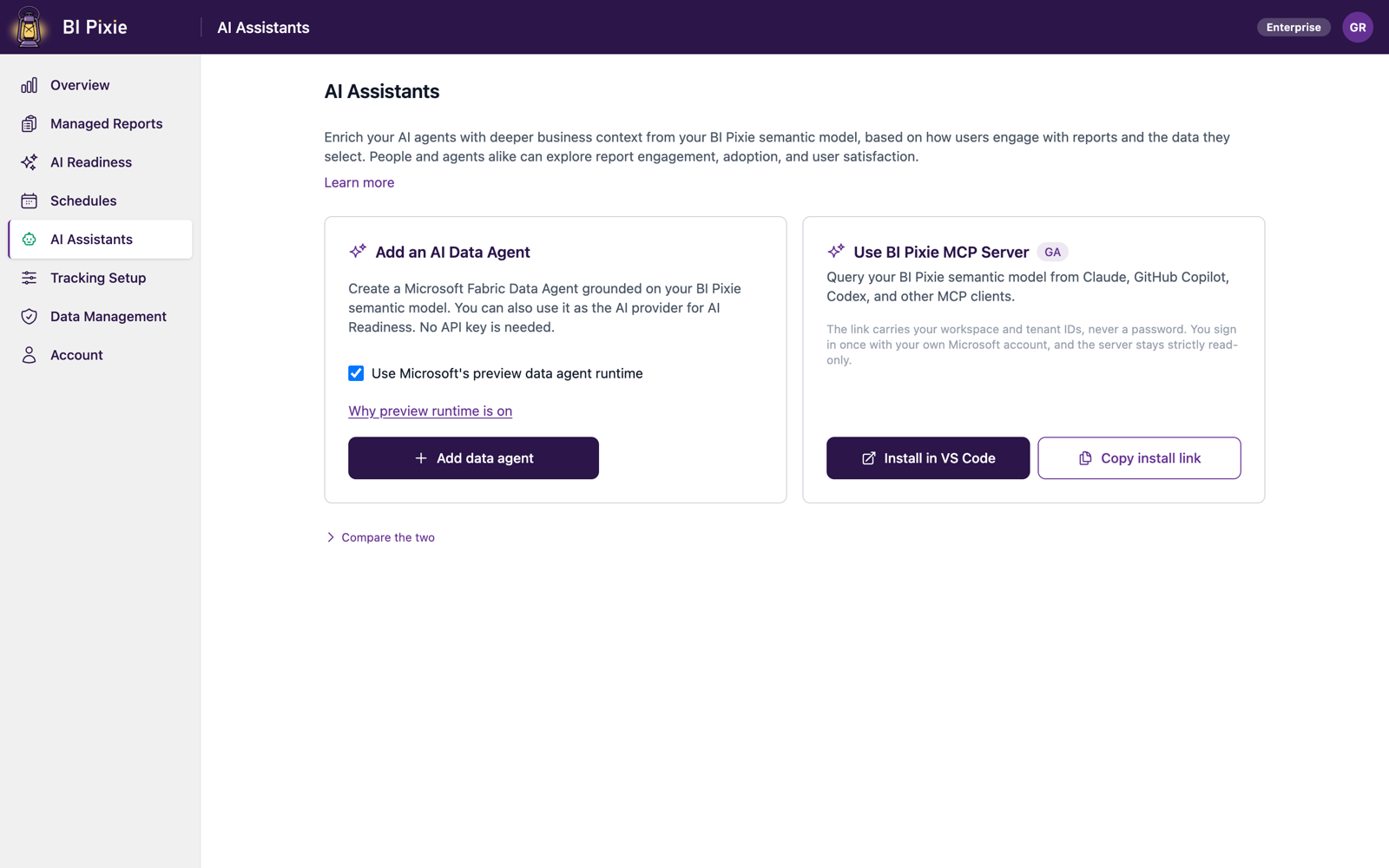
On the AI Assistants page, you connect your AI tools to the BI Pixie semantic model, so that people and AI agents alike can explore report engagement, adoption, and user satisfaction, grounded in the same data as your BI Pixie Dashboard. There are two options:
- Fabric data agent: a native, zero-install data agent that everyone in your workspace can chat with. People ask it questions in plain language inside Microsoft Fabric and Microsoft Copilot. It suits business users best.
- BI Pixie MCP Server: connect your own AI tools (Claude, GitHub Copilot, Codex, Azure AI Foundry) for exact, repeatable, programmatic access. It suits developers, analysts, and automation best.
AI Assistants is in the left sidebar of the BI Pixie portal at app.bipixie.com. You can use either option, or both.
Compare the two
| Fabric data agent | BI Pixie MCP Server | |
|---|---|---|
| Where it runs | Inside Microsoft Fabric | On your own machine, or hosted in your Azure environment |
| Ask from | Microsoft Fabric, Microsoft Copilot, and Copilot Studio, plus Claude, GitHub Copilot, and Codex through the data agent's preview MCP server | Claude, GitHub Copilot, Codex |
| Best for | Business users, developers, and AI coding tools | Developers and AI coding tools |
| Requires | BI Pixie installed in your own Fabric workspace, on a paid Fabric capacity | Any BI Pixie Dashboard deployment |
Add a Fabric data agent
A Fabric data agent runs inside Microsoft Fabric, grounded on the BI Pixie semantic model in your own workspace. Once it exists, anyone with access to that workspace can ask questions about report usage in plain language, with no setup of their own.
Before you start
- BI Pixie must be installed in your own Fabric workspace. If you still use the Power BI dashboard app, you can install BI Pixie in your own workspace from the Overview page, as described in Set up Dashboard. Until then, BI Pixie shows the data agent option on the AI Assistants page as unavailable and explains what it needs.
- That workspace must sit on a paid Fabric capacity. Fabric does not create data agents on a trial capacity.
- Your tenant's Copilot and Azure OpenAI setting must be enabled by a Fabric administrator.
- You need permission to create items in the workspace. Creating a data agent needs a Fabric permission that not every account holds.
Create the data agent
- Open AI Assistants from the left sidebar.
- On the Add an AI Data Agent card, select Add data agent.
- Approve the permission request if you are prompted. BI Pixie creates the data agent under your own identity, grounded on your BI Pixie semantic model.
- When it is ready, the card changes to Open data agent, which opens it in Microsoft Fabric in a new browser tab.
Creating the data agent is safe to repeat. If one already exists, BI Pixie reuses it rather than creating a duplicate.
Publish the data agent
BI Pixie creates a new data agent in draft, and the data agent answers questions only after you open it in Fabric and publish it in the data agent editor. After that, anyone with access to the workspace can ask it questions from Fabric or Microsoft Copilot.
Use the data agent as your AI
The data agent has a second role: it can serve as your AI in AI Readiness, the AI that writes the descriptions, AI Instructions, folder names, and benchmark question wordings BI Pixie proposes for your semantic models. Choosing it means there is no API key to paste and no separate account to manage, because the data agent runs on your own Fabric capacity.
Once the data agent exists, its card offers Use for optimizations. Selecting it opens the same Set up AI dialog the AI Readiness page uses, so that you can connect the data agent as your AI without leaving this page.
Use for optimizations appears only for admins, because your AI is a shared account setting rather than a personal one. You can change it later from the Account page, on the AI tab. To use your own Azure AI Foundry, OpenAI, or Anthropic account instead, you can choose that service in the Set up AI dialog. See AI Setup.
If BI Pixie cannot create the data agent
- "You need permission to create a Data Agent in this workspace": a workspace admin can grant you Contributor access, or create the data agent on your behalf.
- Any other failure: the cause is most often a trial capacity or a tenant Copilot setting that is switched off. Your Fabric administrator can check both, and you can then try again.
Use the BI Pixie MCP Server
The BI Pixie MCP Server lets AI tools you already use query your BI Pixie semantic model directly. Its usage tools are read-only, so they never change, delete, or refresh your data. Since bipixie-mcp 0.6.0 the BI Pixie MCP Server also carries tools that work in BI Pixie as you, through the BI Pixie API. They come with the local install, and with a hosted deployment whose deployer turned them on. Each of those shows you what it would change and waits for your answer first.
The quickest way to connect is from the portal:
- Open AI Assistants from the left sidebar.
- On the Use BI Pixie MCP Server card, select Install in VS Code. The link is already populated with your workspace and semantic model, so no manual configuration is required.
- Run a one-time
az loginso that the server can sign in as you.
To set it up by hand, or to connect a tool other than VS Code, see the MCP Server guide, which covers the full configuration, the available tools, and troubleshooting.
The install link carries your workspace and tenant IDs, never a password. You sign in once with your own Microsoft account, and the server only ever sees the data your account can already see.
Related
- BI Pixie MCP Server: full setup, tool reference, and troubleshooting.
- BI Pixie Semantic Model: what both options query.
- AI Readiness, where BI Pixie assesses whether your semantic models are ready for Copilot and data agents, and you fix the gaps it finds.