
Fabric Data Agent Score Dimensions
To find what lowered a data agent's score and what to change, look up its dimensions on this page. In each dimension, you find the checks for one part of the data agent's setup, and each check tests one place where the setup might not follow Microsoft's published guidance.
Every score follows these rules:
- A dimension that doesn't apply is left out of the score, not counted as passed. For example, a data agent grounded only on semantic models has no example queries to check.
- A check that couldn't run is also left out.
- If the data agent has no instructions, you see only that one finding for instructions. The other instruction checks run once there are instructions.
- On the score card, you also see the Score limit from semantic models dimension. See Understand the score limit from semantic models.
To see the points each dimension cost, select Why this score? on the score card.
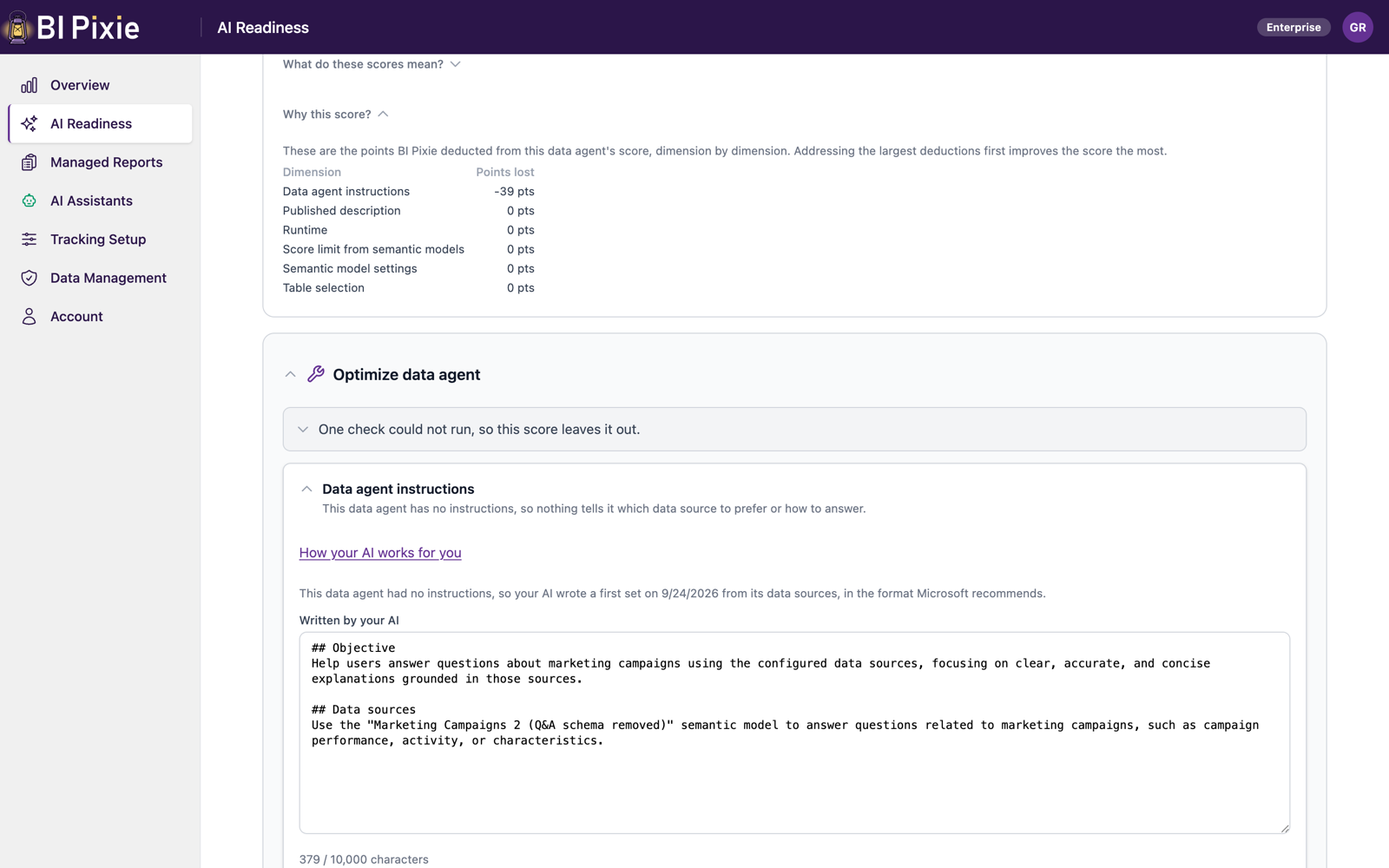
Dimensions and checks
In the table, the two middle columns show what is checked without AI and what your AI is asked when you select Ask your AI.
| Dimension | Checked without AI | Asked of your AI (when you select Ask your AI) | Applies to |
|---|---|---|---|
| Data agent instructions |
| Whether a sentence that names no table, column or measure is still about the data in one data source. | Every data agent |
| Recommended format |
| Nothing | Every data agent |
| Grounding matches the AI data schema | The tables the data agent uses from a semantic model are the tables that semantic model's AI data schema defines. | Nothing | Semantic model sources |
| Table selection | Every table the data agent selected still exists in the source. | Nothing | Every source whose tables can be read |
| Semantic model settings | A semantic model source has no data source instructions and no data source description, because Microsoft Fabric doesn't read either for a semantic model. | Nothing | Semantic model sources |
| Published description | The data agent has a published description. An AI that chooses which data agent answers a question reads this description. | Nothing | Every data agent |
| Runtime | The data agent runs on Microsoft's preview runtime. Only the preview runtime has Microsoft's advanced query generation for semantic models and reads schema object descriptions. | Nothing | Every data agent |
| Data source setup |
|
| Lakehouse, warehouse, KQL database, SQL database and mirrored database sources |
| Example queries |
|
| Lakehouse, warehouse, KQL database, SQL database and mirrored database sources |
| Schema object descriptions |
|
| Lakehouse, warehouse, SQL database and mirrored database sources |
| Data sources a semantic model already covers | The data agent is grounded on both a semantic model and the lakehouse, warehouse or mirrored database that the semantic model reads through Direct Lake. Both hold the same data, but only the semantic model has the measures, relationships and descriptions. A question about that data can be sent to the copy without them. | Nothing | Data agents grounded on both |
| Tables report viewers never use | The selected tables that no report viewer uses, next to the tables used most. Usage comes from the Pixies on reports over the Direct Lake semantic model built on the source. You find this under Fix on your own. It is never scored, because the data agent may still need such a table for a join or for a question no report answers. | Nothing | Lakehouse, warehouse, SQL database and mirrored database sources that a Direct Lake semantic model with tracked reports is built on |
Microsoft's rules behind the checks
Most findings come down to five rules from Microsoft's documentation. When you open a dimension, you see the rule quoted with a Learn more link. The rules come from Data agent configurations, Semantic model best practices for data agent, Data agent configuration best practices and Add schema object descriptions.
- What belongs in a data agent's instructions. "Data agent instructions should only include guidance that applies across all data sources configured in the agent, such as general response formatting preferences, cross-source routing rules, common abbreviations, tone, and so on."
- What a data agent's instructions cannot do for a semantic model. "The DAX generation tool only refers to the AI instructions configured in Prep for AI of the semantic model. Data agent instructions aren't passed to the tool and are ignored when querying semantic models. For this reason, don't add semantic model specific instructions at the data agent level." Microsoft states the same limit for a semantic model source's own settings: "Unlike other data sources, data agent doesn't support data source instructions or descriptions for semantic models."
- What a data source description is for. "A description should summarize what the data source contains, the types of questions it can answer, and any business-specific nuances that help distinguish it from other sources."
- Where a definition belongs. "Place a definition in the schema object description when it applies to one object. Place it in data source instructions when it applies across the data source or affects multi-object query logic."
- What editing an inherited description does. "By default, the data agent inherits available descriptions from the data source and updates them automatically. When you edit an inherited description in the data agent, the change applies only to the data agent. It doesn't overwrite the description in the source, and that object no longer receives description updates from the source."
- Instructions or a description on a semantic model source. Microsoft Fabric doesn't support them for a semantic model.
- Data agent instructions that explain how to query a semantic model. Microsoft Fabric never passes them to the tool that writes the DAX query.
Guidance about a semantic model's data belongs in that semantic model's AI Instructions, in Prep data for AI. Guidance that applies across sources, such as which source answers which question, the tone of answers and abbreviations, belongs in the data agent's instructions.
Ask your AI about wording
Some checks are about wording, such as whether a description says what its source contains or whether an example question is clear. To have your AI answer those checks and propose new instructions in the same round:
- Open the data agent's assessment, and go to the Data agent instructions card under Optimize data agent.
- Optionally, open How your AI works for you to see Which AI you are asking and which account or capacity it uses, How many questions the round asks at most, and What changes when it runs.
- Select Ask your AI.
- Review the proposed instructions on the same card. Nothing is written to the data agent until you apply them. See Optimize a data agent.
Asking your AI works as follows:
- A data agent grounded only on semantic models has one such check, about its instructions. Each other source adds up to ten.
- Your AI's verdicts are scored with the other checks, so the score can go up or down. A check your AI didn't answer is left out of the score.
- No change figure is shown between an assessment that asked your AI and one that didn't, because the two answered different questions.
- Answers are kept. In the next round, your AI is asked only about what changed, and in a round on an unchanged data agent, it is asked nothing.
- A scheduled assessment never asks your AI, because asking your AI needs you signed in.
- If the data agent has nothing for your AI to read, Ask your AI isn't offered.
Your AI receives the data agent's instructions, the instructions and descriptions of its data sources, its example queries, its schema object descriptions, and the names of the tables, columns and measures they mention. It never receives the data in your tables. For the full list, see AI setup.
Before your first round:
- To set up your AI, select Set up your AI.
- To let BI Pixie ask the BI Pixie data agent questions on your behalf, select Grant access. This permission is separate from the storage permission in Grant access to read a source.
Where the questions run and what they cost
- Azure AI Foundry, OpenAI or Anthropic: the questions run against that account, and its charges apply. Nothing runs on your Fabric capacity.
- The BI Pixie data agent: each question is answered by the data agent BI Pixie installed beside its dashboard, on the Fabric capacity of that workspace. See Microsoft's data agent consumption terms, which can change.
BI Pixie doesn't read your capacity's consumption, so it can't show what a round used. Before you ask, you can check the most questions a round can ask in the How many row. To measure your own data agent with the Fabric Capacity Metrics app, see How to Measure What a Fabric Data Agent Costs Per Question.